AI Models Types: A Guide to Image and Video Generation
ImagesArt.ai
11/2/2026
You type the same prompt into three tools: a bottle rotating on a marble counter. One gives you a polished product shot, another bends the label, and the third adds a sweeping camera move you didn't ask for. The difference isn't just the interface. It's the model underneath, the inputs it accepts, and the controls available for that particular job.
Table of Contents
- What an AI Model Is and Why Types Matter
- The Main AI Model Types at a Glance
- How Generative Models Build Images and Video
- How Image and Video Generation Differ
- Common Misconceptions About AI Model Types
- Matching a Model Type to Your Task
- How to Build a Short Video Ad Step by Step
- Test Two Model Types on One Brief
What an AI Model Is and Why Types Matter
An AI model is a learned system that finds patterns in training data and uses those patterns to make predictions or create content. Your prompt supplies instructions at generation time. It doesn't rebuild the model or guarantee that every requested detail will appear.
Think of a model as a chef trained for a particular cuisine. A pastry chef and a grill cook both prepare food, but you wouldn't choose between them by asking who owns the biggest kitchen. You'd ask who can make the dish you need.
The model is not the whole tool
A creative tool wraps a model in an interface, upload options, editing controls, and export settings. Two tools can use related models yet produce different experiences because they expose different controls.
A model type describes something about the system's purpose or design. Some types classify information, some produce language, and others generate images or moving scenes. These labels can overlap, so they aren't always separate boxes.
Start with the job: Ask what the underlying model was built to do before judging the tool by its sample gallery.
For a product creator, that means separating distinct needs. Writing a campaign hook is a language task; composing a hero image is a visual task; animating that image requires control over movement and continuity.
A useful understanding of AI model types answers three practical questions: what each family does, how generation works, and which family fits your production constraints. When you encounter a new tool name, translate it into a simpler question: What job is its model trained to perform, and what can I control?
The Main AI Model Types at a Glance
The 2017 transformer architecture helped enable today's large, general-purpose models, and its core attention-based design now supports language, image, audio, and video applications, as described in IBM's deep learning overview.
Attention lets a model weigh relationships among pieces of input, such as words or image elements. That shared architectural idea helps explain why systems for very different media can have related foundations.
The diagram shows that architectural connection across media.
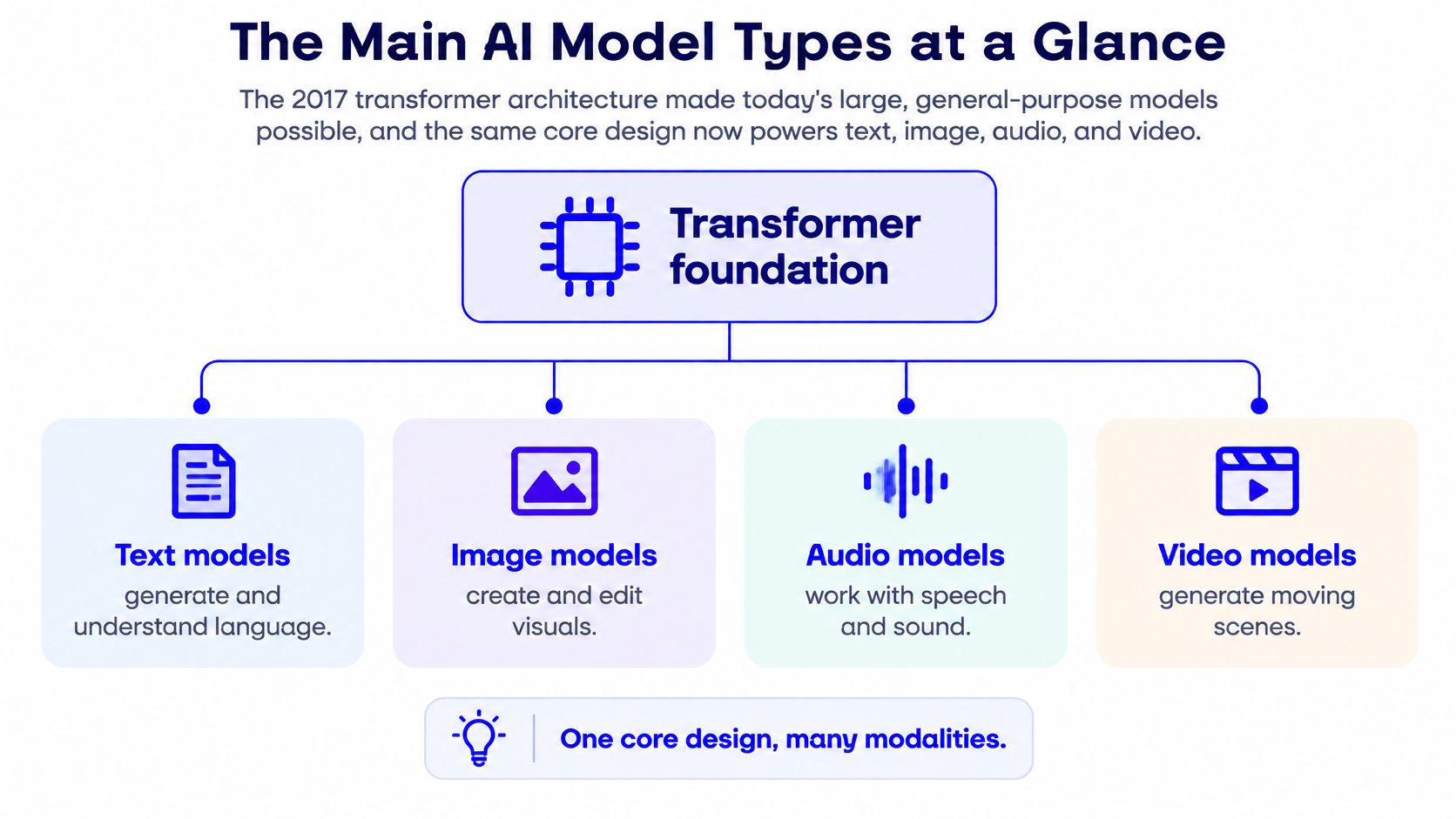
A hierarchy with overlapping branches
Put foundation models at the top of a practical hierarchy: they're broad bases that can be adapted to downstream tasks. Beneath them, you'll encounter tools specialized for writing, visual generation, understanding images, or other jobs.
But this isn't a strict family tree. Generative describes what a model does, diffusion describes a generation method, multimodal describes the inputs or outputs it handles, and small describes its scale. A single system can carry several labels.
Main AI model types, jobs and examples
| Model type | Core job | Everyday example | Typical output |
|---|---|---|---|
| Discriminative | Classifies or predicts a label | Spam filter, fraud alert | Label or score |
| Generative | Creates new content | Drafting, image synthesis | New text, images or audio |
| Large language model | Predicts and produces text | Chat assistants, summarizing | Text |
| Multimodal | Handles more than one data type | Describing a photo in words | Text from image, or image from text |
| Diffusion | Generates images or video by removing noise | Text-to-image, image-to-video | Images or video frames |
| Foundation model | General base adapted to many tasks | One base model adapted for several tools | Text, visuals or predictions after adaptation |
| Small language model | Handles narrow tasks efficiently | On-device assistant | Text with low latency |
What the labels mean in production
A discriminative model could flag whether an uploaded product image contains a person. A generative model could create a new background for that product. The first makes a decision about existing material; the second creates material.
A large language model can help draft a shot list or summarize customer reviews into campaign themes. A multimodal model can examine a product photograph alongside written instructions, although accepting images doesn't automatically mean it can generate video.
A diffusion model is especially relevant to visual production. A small language model may be useful for a constrained writing or tagging task where broad knowledge matters less than deployment efficiency.
Model size isn't a complete capability score. Stanford's 2025 AI Index reports that the smallest model exceeding 60% accuracy on MMLU fell from 540 billion parameters in 2022 to 3.8 billion in 2024, illustrating how efficiency can improve without matching an earlier model's size.
The simplest first test remains useful: if it creates new content, it's generative; if it sorts or predicts labels, it's discriminative.
How Generative Models Build Images and Video
Think of a photograph buried in TV static. A diffusion model learns to reverse a noise-adding process, then generates content by starting with sampled noise and progressively removing it under guidance from your inputs, as explained in this video diffusion research overview.
The illustration makes that gradual refinement easier to recognize.
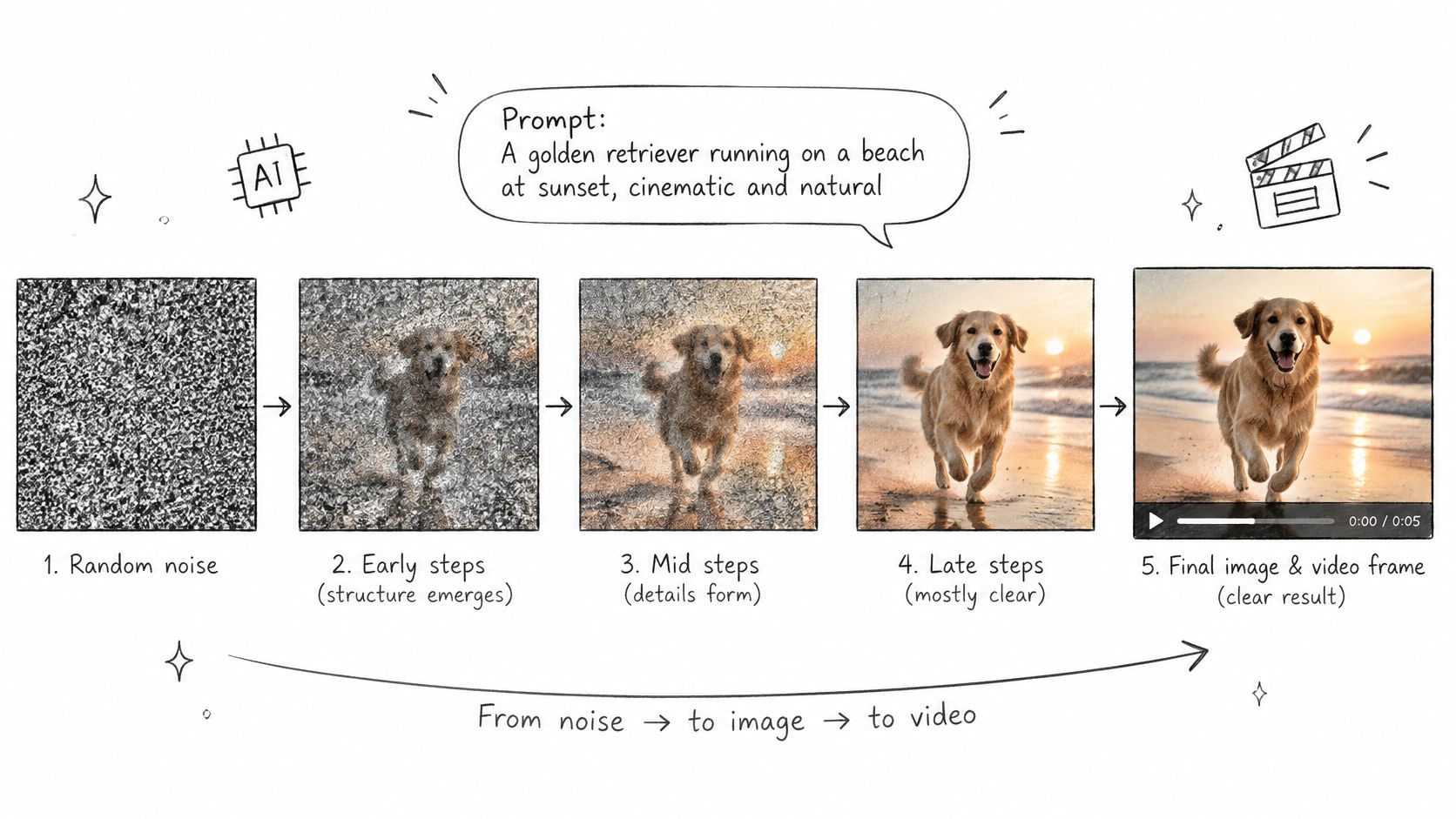
Each pass is a denoising step. More steps can improve fidelity and prompt adherence, but they also increase processing time; larger spatial and temporal representations add memory demands. If the interface exposes this setting, don't assume its maximum is the best starting point.
Video adds temporal dependencies. The model must produce a convincing bottle while maintaining its shape, lighting, and appearance as the scene changes. Early approaches processed frame sequences together; longer generation can also condition new segments on earlier frames.
Controls that make testing manageable
- Keep the test short. Generate only enough motion to evaluate the idea.
- Use moderate resolution. Check composition and movement before paying for publication settings.
- Provide a visual target. A clear product photo or opening frame reduces ambiguity.
- Refine the selected take. Raise quality settings only after the action works.
For a concept without source photography, an image-generation workspace can help you prepare the opening composition before animating it. For planning product assets around campaign needs, Rapid Ads' creative production guide for media buyers provides complementary production context.
Use the accompanying video as a visual supplement to the process.
Watch for drift, where a label, face, or object gradually changes. A beautiful opening frame doesn't prove that the rest of the clip is usable.
How Image and Video Generation Differ
An image model has to produce a convincing still. A video model has to produce a convincing sequence whose parts remain compatible over time.
That changes how you brief, inspect, and budget the work. A bottle that looks correct in a thumbnail can still deform when it turns.
Image generation compared with video generation
| Aspect | Image generation | Video generation |
|---|---|---|
| Output | One still frame | Sequence of frames, sometimes with sound |
| Main challenge | Composition and fine detail | Stability across time, so faces and products do not drift |
| Control inputs | Text prompt, reference image, edit | Text, start frame, end frame, reference images, camera direction |
| Quality checks | Sharpness, anatomy, legible text | Frame-to-frame stability, realistic motion, prompt match |
| Compute cost | Generally lower per output | Generally higher, rising with duration and resolution |
| Typical use | Thumbnails, mockups, ad stills | Reels, TikToks, product demos, transitions |
What changes at each production stage
Output and composition: For a still ad, you can judge the entire composition at once. For a product demo, you also need to inspect where the object travels and whether it leaves space for your headline throughout the shot.
Control inputs: A still-image edit might ask for a warmer background while preserving the product. An image-to-video workflow starts from the photograph and adds instructions for action, such as a restrained camera push toward the packaging.
Quality checks: In an image, inspect the bottle cap, label, reflections, and edges. In video, scrub through the turn and check whether those same details remain attached to the object rather than sliding across its surface.
Cost: Treat the table's compute comparison as a production tendency, not a universal price rule. A premium still can cost more than a low-resolution video preview, so compare the actual generation settings and the number of rejected attempts.
Use case: A new background may be enough for an ad still. Motion earns its place when it demonstrates something, such as how a clasp opens, how fabric falls, or how a finished room differs from its starting state.
Test the concept as a still first. Move to video when the movement itself communicates something the still cannot.
This also prevents unnecessary animation. If the strongest message is a clear offer and recognizable packaging, a well-composed image may be the more practical asset.
Common Misconceptions About AI Model Types
Bigger always wins
Size alone doesn't tell you whether a model fits your task. The SmolVLM paper reports that SmolVLM-256M uses less than 1 GB of GPU memory and outperforms Idefics-80B on its reported evaluation; its 2.2-billion-parameter version rivals state-of-the-art vision-language systems using roughly twice its GPU memory.
Those are evaluation-specific findings, not proof that a compact model wins every creative task. Your practical test should use your own inputs and acceptance criteria.
One model does everything best
A multimodal model may understand both your photograph and your written brief without offering the strongest motion controls. Broad input support and specialized production capability are different things.
- For a campaign script: Evaluate clarity, tone, and factual accuracy.
- For a product visual: Inspect reference fidelity and fine detail.
- For a moving scene: Check motion, continuity, and available controls.
Generated output is ready to publish
Plausible output can still be inaccurate, incomplete, biased, or misleading. A generated product demonstration may depict a function the actual product doesn't have.
Human review must cover both appearance and claims. Inspect on-screen text, packaging, depicted behavior, and any spoken dialogue before approval.
Video is just a stack of attractive images
The difficult requirement is coherence over time. A clip with lovely individual frames can fail if a hand changes grip impossibly or a necklace passes through clothing.
Review transitions and interactions, not just selected screenshots. Those are often where a seemingly finished shot becomes unusable.
Small or local models are always weaker
A narrow task can favor a smaller system with lower latency, easier local privacy controls, or more predictable behavior. Local deployment still needs sensible device security and access controls; it isn't a privacy guarantee by itself.
Choose by consequence: Judge the model by the job, the total production cost, and the failure it causes, not its size.
Matching a Model Type to Your Task
The best production model is often the one whose failures you can predict and afford. Choosing it is a workflow decision, not a contest for the most impressive sample.
In the enterprise evidence summarized in the 2025 cloud and generative AI survey, data security is cited as an adoption concern by 71% of respondents, while model accuracy is cited by 34%. Those concerns matter even to a small team uploading unreleased packaging or customer imagery.
Model type to start with for each common task
| Task | Model type to start with | Why | What to check |
|---|---|---|---|
| Brainstorming many concepts | Fast generative image or text model | Cheap, quick iterations | Concept matches the brief |
| Final product ad frame | Higher-quality image generator | Detail matters most | Text, logos and edges |
| Animating a product photo | Image-to-video diffusion model | Uses the source image as guidance | Product shape stays stable across frames |
| One person across several scenes | Reference-aware model | Consistency from several reference images | Face and clothing drift |
| Before-and-after transition | Start-end frame video model | Defined endpoints | Motion path looks plausible |
| Private or offline drafts | Small or on-device model | Privacy and low latency | Quality limits for the brief |
Choose the constraint before the model
Start by naming the deliverable, then identify the failure that would make it unusable. For a skincare ad, that might be an altered package label; for a fashion clip, it might be a changed garment silhouette.
Next, choose the inputs that constrain that failure. Use a product photograph when exact appearance matters, several compatible references when identity matters, or defined opening and closing images when the transformation needs clear endpoints.
Finally, compare total production cost. Include retries, review, corrective editing, and export work, not just the credits spent on the accepted generation.
For teams coordinating several asset types, Sprello's overview of AI tools for e-commerce content workflows offers useful context for organizing the broader process.
A start-end frame model doesn't guarantee a plausible journey between the endpoints. Likewise, a reference-aware model guides consistency rather than locking every pixel. Write down the failure you cannot tolerate, then select and test the model that gives you the most useful control over it.
How to Build a Short Video Ad Step by Step
Say you need a short bottle reveal for a mobile campaign. Keep the production brief narrow enough that you can tell whether a generation succeeded.
The process below connects inputs, output settings, and review.
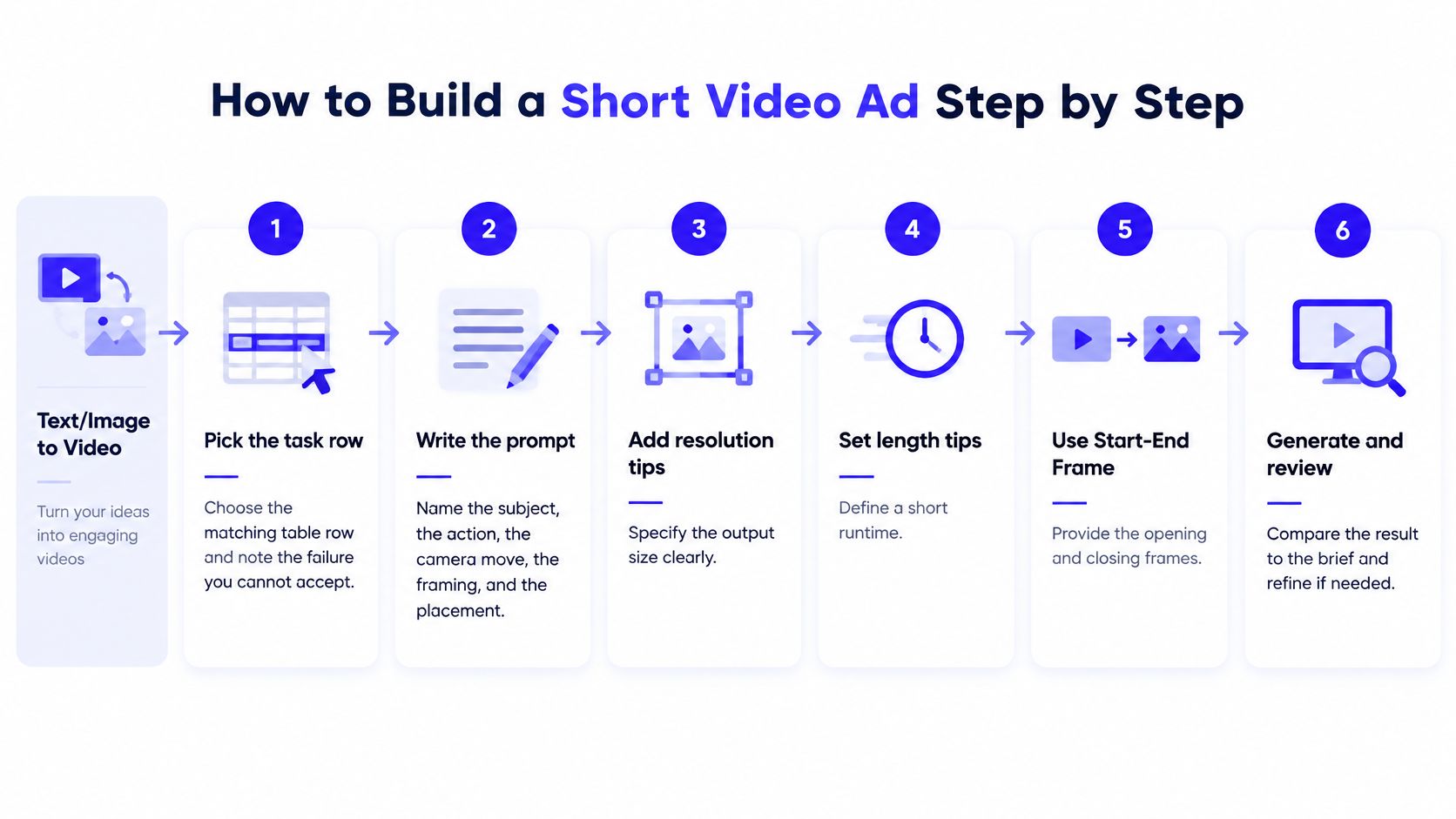
Choose the task and unacceptable failure. For an existing product photograph, start with image-to-video. Record that the package shape and label must remain recognizable.
Write a concrete prompt. For example: vertical product demo, close-up of the bottle rotating slowly on marble, clean studio lighting, restrained camera push, label facing the camera, leave the lower third clear for captions. Name the subject, action, camera movement, framing, and placement rather than asking for something cinematic.
Set a concise runtime. Begin within 9–15 seconds, the recommendation in TikTok's reservation in-feed ad specifications, which also specify the TikTok dimensions and delivery requirements below. Expand only when the demonstration needs additional time.
Set the delivery format. Use the placement-specific requirements in the table, rather than assuming every export is publishable. Instagram's Reels guidance permits 1.91:1 through 9:16, requires at least 720 pixels in resolution, and sets a minimum of 30 fps.
Short-form ad format specifications
| Platform and format | Minimum size | Length | Delivery notes |
|---|---|---|---|
| TikTok vertical 9:16 | 540×960 px | 9–15 s recommended, 5–60 s allowed | MP4, MOV, MPEG or 3GP; max 500 MB; at least 2,500 kbps |
| TikTok horizontal 16:9 | 960×540 px | 9–15 s recommended | Same delivery rules as vertical |
| TikTok square 1:1 | 640×640 px | 9–15 s recommended | Same delivery rules as vertical |
| Instagram Reels 1.91:1 to 9:16 | 720 px resolution minimum | Use a concise first cut; confirm placement limits | Minimum 30 fps |
The TikTok rows describe reservation in-feed specifications, not every TikTok buying format.
Change only the opening hook. Try a label-first opening, a close-up of the cap, and a wider countertop reveal while holding the rest of the treatment steady. For garment-focused concepts, Picjam's guide to create fashion product videos with AI provides a relevant workflow reference.
Review the whole clip. Inspect product drift, impossible motion, audio, and space for captions and interface overlays. If using start-end frames, check the transition rather than approving only the endpoints.
Save the production record. Download the strongest take and retain its prompt, source assets, model, and settings. Changing several variables at once makes a winning variation harder to explain or repeat.
Test Two Model Types on One Brief
Choose a real product reveal and run a small comparison: a fast text-to-video concept versus image-to-video using a photograph you own. Keep the creative brief constant, while allowing each workflow the input it needs.
Use a simple acceptance test
- Product stability: Does the shape, packaging, or garment remain recognizable throughout?
- Motion match: Does the action follow the brief without distracting additions?
- Publication readiness: Can a human reviewer approve it without substantial repairs?
Keep the option that wins your most important check, not necessarily the prettiest opening frame. Save the successful prompt and settings alongside the result.
ImagesArt AI's multi-model access removes the need to switch services for this comparison. Our dropdown includes Seedance 2.5, Seedance 2.0 (Mini, Fast and full), Kling 3.0, Veo 3.1 (Lite, Fast and Quality), Gemini Omni Flash, Grok Imagine 1.5, MiniMax H3 and Wan 3.0; our Seedance model comparison offers a focused starting point.
Our Reference mode accepts up to 7 uploaded images of people, products, or places and combines them into one scene. Videos run 1–15 seconds, depending on the model, and new accounts receive 15 free credits to begin testing.
Check the displayed credit cost before each run. The free allocation isn't a guarantee that every pair of model settings will fit, and a preview still needs to meet your intended publication requirements before you use it.
ImagesArt AI offers Text/Image to Video, Start-End Frame, Reference, and image tools in one account, so you can compare approaches against the same creative brief. Visit ImagesArt AI, bring a product photo you own, and start with a short test whose success criteria you can clearly judge.