AI Pricing Models for Creators in 2026
ImagesArt.ai
10/29/2026
Your team has a product photo, an unpaid storyboard, and a plan to turn both into several vertical ads. Before anyone animates the bottle, someone has to decide whether to subscribe, buy credits, or pay once for the project.
The useful question isn't which tool offers the cheapest generation. It's how much you'll spend to get clips your team approves, edits, and publishes.
Table of Contents
- Five AI Pricing Models Side by Side
- What a Credit Actually Measures
- Subscription Prices and Credit Packs
- How to Budget a Reel or Product Demo
- Forecast Campaign Spend and Cost per Accepted Asset
- Choose a Plan or a One-Time Pack
Five AI Pricing Models Side by Side
How common AI pricing models charge
| Model | What you pay | Fits best | Main risk |
|---|---|---|---|
| Subscription | Fixed monthly or yearly fee with a recurring credit allowance | Steady posting calendars | Paying for credits you never render |
| Usage-based credits | A metered charge per generation, often shown before you submit | Uneven tests and client work | A busy week with no cap |
| One-time credit pack | Prepaid credits, no automatic renewal | A launch, pitch, or trend test | Buying more credits than the job needs |
| Hybrid | Base subscription plus extra credits when you exceed the allowance | Teams with a floor of work and occasional spikes | Two balances that are easy to misread |
| Outcome-based | A fee tied to an approved or published result | Custom agency deals, rarely self-serve video tools | Hard to define when the buyer controls revisions |
These billing arrangements can overlap with broader packaging categories, including free tests and enterprise contracts.
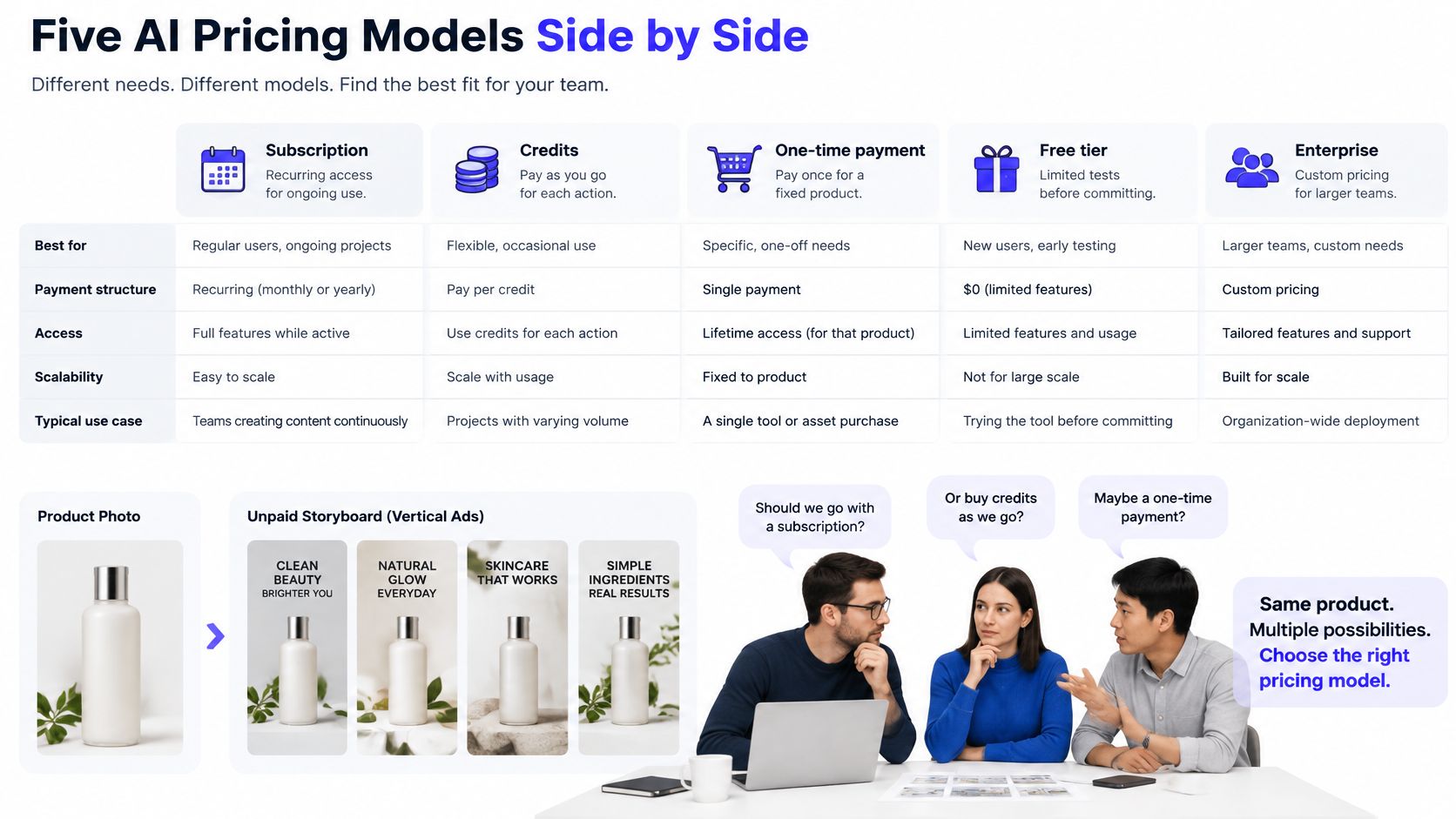
Match the payment to your workload
Think of these options as transit purchases. A subscription is a monthly pass that refills an allowance and may enable resolution, storage, or support. Usage-based credits are tickets stamped per ride, while a one-time pack is a ticket booklet without renewal. Hybrid pricing combines the pass with extra tickets when work spikes.
For a creator with a regular posting calendar, a subscription gives production a predictable starting budget. It doesn't necessarily mean unlimited generation: the recurring payment can buy a finite allowance.
Usage-based billing suits irregular demand because you consume credits as you work. A quiet testing week and a busy client week won't require the same amount of generation, but you still need a spending cap.
A one-time pack fits a project with a clear ending. Hybrid pricing is more useful when your team has ongoing work plus occasional launches, seasonal campaigns, or client revisions.
Outcome-based pricing changes what the seller promises. Instead of billing for attempts, the seller charges for an agreed result. That's easier to negotiate in a custom agency engagement than in self-serve video, where the buyer controls prompts, revisions, and approval standards.
Why AI bills include a usage meter
A 2025 survey summarized by Orb found that, among 240 software and AI companies, flat-fee subscription adoption fell from 29% to 22% over the preceding year while hybrid pricing increased from 27% to 41%; a separate survey of 100 enterprise CIOs across 15 industries found preferences of 39% for usage-based pricing, 21% for seat-based pricing, and 23% for hybrid pricing.
Those enterprise preferences aren't a creator buying guide, but the underlying cost issue applies: generating another clip requires additional compute. A credit meter lets providers charge differently for light image work and intensive video production rather than treating every account as equally expensive.
Your full production budget also includes editing. For help separating generation spend from assembly, captions, and finishing, ContentBuck's guide to editing costs is a useful planning resource.
The best AI pricing models make both commitments visible: what you pay to maintain access and what you spend to produce usable work.
What a Credit Actually Measures
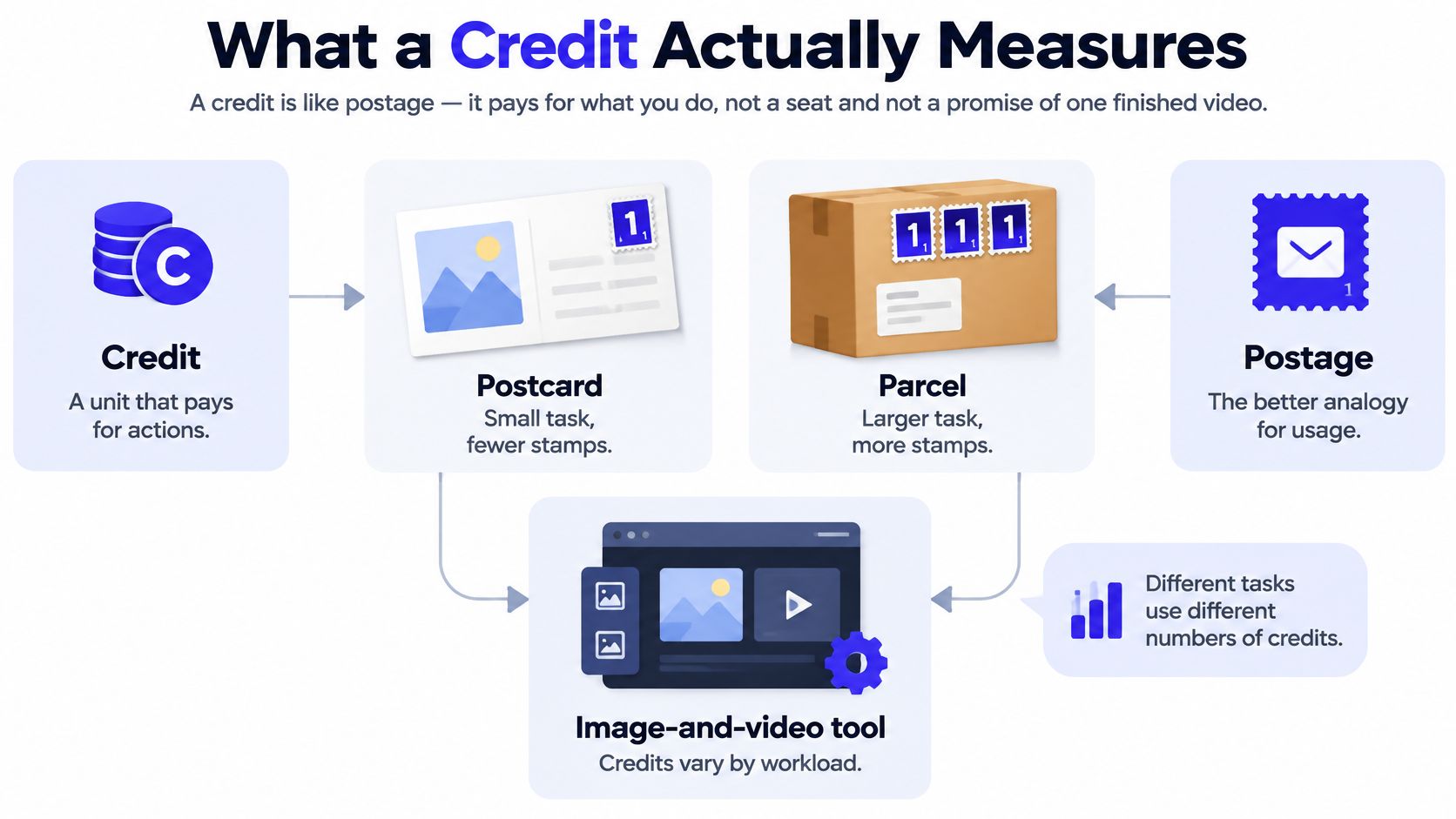
A credit is closer to postage than a seat license. A postcard and a parcel both need stamps, but they don't need the same number. Likewise, an image edit and an audio-enabled video can draw from the same balance without costing the same amount.
This is why credits aren't a promise of finished videos. They're units used to pay for generation actions.
What changes the workload
The useful technical anchor is marginal inference cost per successful generation, rather than a model's name alone. Jinba's explanation of inference costs describes how throughput, utilization, architecture, and processing choices change the cost of producing an output, even when the hourly hardware price stays unchanged.
Creators don't need to rent GPUs or calculate infrastructure margins. You do need to recognize which choices can make a task more demanding:
- Model selection: Different models process the same creative request differently.
- Resolution and frame rate: More detailed output can require additional processing.
- Duration: A longer shot asks the model to maintain motion and consistency longer.
- Audio and inputs: Sound generation and source-image processing can add work.
On ImagesArt AI, the generation cost depends on your chosen model, resolution, and duration. The cost displayed before generation is the cost that applies, and our site states that you only pay for what you render.
Some models accept any duration within their supported range. Others offer fixed lengths of 4, 6, or 8 seconds, so extending a hold may require selecting a different available output instead of dragging a duration slider.
Run a settings check before a batch
Open the generation controls with your actual product photo and prompt ready. Choose the shortest duration that can demonstrate the intended movement, then read the credit cost on the Create button.
Next, change the resolution without changing the prompt. Compare the displayed debit, then test the duration separately so you can see which setting changes the budget.
Practical rule: Don't approve a batch from the model name. Approve it from the displayed cost and the shot you need.
For example, compare a short, low-resolution motion test with a longer, higher-resolution production setting. If the test only needs to answer whether the camera movement works, don't pay for final-delivery detail yet.
Unlimited access can sound simpler, but intensive video still has a real processing cost. Transparent metering gives you a more useful decision: whether this particular render deserves its debit.
Subscription Prices and Credit Packs
ImagesArt plans and one-time credit packs
| Option | Price | Image credits | Renewal or expiry |
|---|---|---|---|
| Free | $0 | 15 once, no refill | No expiry |
| Starter monthly | $9.90 per month | 450 per month | Until cancelled |
| Starter yearly | $71.00 per year | 450 per month | Until cancelled, reminder before renewal |
| Pro monthly | $19.90 per month | 1,350 per month | Until cancelled |
| Pro yearly | $143.00 per year | 1,350 per month | Until cancelled, reminder before renewal |
| Ultimate monthly | $49.90 per month | 3,600 per month | Until cancelled |
| Ultimate yearly | $359.00 per year | 3,600 per month | Until cancelled, reminder before renewal |
| 600-credit pack | $19.90 once | 600 | No renewal; expires 30 days after purchase if bought before September 29, 2026, otherwise no expiry |
| 1,500-credit pack | $39.90 once | 1,500 | No renewal; expires 30 days after purchase if bought before September 29, 2026, otherwise no expiry |
| 2,500-credit pack | $59.90 once | 2,500 | No renewal; expires 30 days after purchase if bought before September 29, 2026, otherwise no expiry |
All prices are in US dollars. The allowances are labeled image credits, not counts of finished videos: video generation draws on the same balance, with each clip's debit determined by its settings.
Read the allowance separately from the bill
A yearly plan changes when you pay, not the stated monthly allocation. For example, paying annually for Starter provides its monthly allowance throughout the subscription rather than describing a single annual batch of credits.
The plan comparison page is the purchase lookup for matching an allowance to your production calendar. There's no separate per-seat fee in this grid, so don't multiply the listed subscription price by your team's head count when reading these rows.
The Free allocation is granted once at sign-up. It doesn't expire, but it doesn't refill either, which makes it an introductory test balance rather than a recurring production allowance.
A pack is different from a subscription because buying one doesn't start automatic renewal. Choose the pack against a scoped project, not against an optimistic assumption that every purchased credit will become a publishable clip.
Understand checkout and renewal
The pricing page displays a Limited Time: Save 40% label beside the Monthly and Yearly options. Treat the listed yearly prices as the offered prices; don't apply an additional discount to them.
Keep these billing details in your purchase checklist:
- Taxes: Listed prices exclude tax. Applicable sales tax, VAT, or GST is calculated and added at checkout.
- Renewal: Subscriptions renew at the then-current price at the start of each billing period until cancelled.
- Annual reminder: We send a reminder before an annual subscription renews.
- Payment method: Subscription plans are paid by bank card.
For adjacent music-video workflows, you can explore pricing insights from AIMVG to identify comparison questions around recurring fees and generation allowances. Compare what each allowance buys rather than treating credit counts across tools as interchangeable.
An allowance tells you how much spending capacity you have. It doesn't tell you how many approved ads you'll finish.
Before choosing a row, list your recurring deliverables, likely variations, and finishing work. A plan that comfortably covers experiments but leaves nothing for the approved version isn't sized to the actual job.
How to Budget a Reel or Product Demo
Budget the shot before you budget the finished edit. A product demo often needs a legible label, controlled movement, and space for captions more than it needs an elaborate scene.
Use a staged workflow so you can reject weak concepts before committing to final settings.
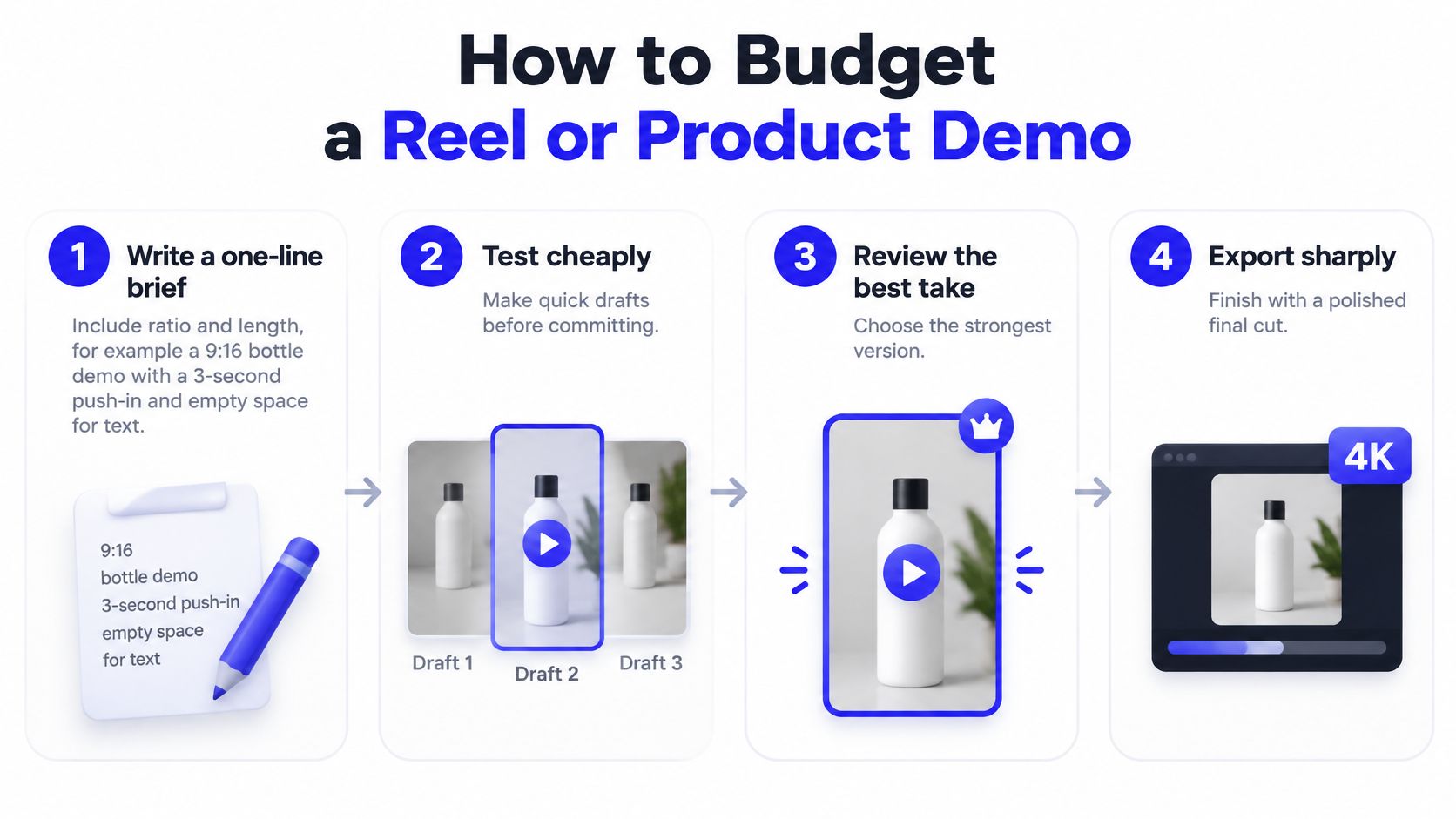
Build the shot before polishing it
Write a one-line brief. For example, plan a vertical bottle demo with a close-up, a slow push-in, and clean space above the product for headline text. Specify the intended duration and composition before choosing a model so the settings serve the ad.
Choose the right input method. Use Image to Video when you already have a clear product photograph, or Text to Video when you need a new scene. Start & End Frame to Video suits a planned reveal or before-and-after transition. Reference to Video accepts up to 7 images when people, products, or places need visual guidance.
Select a model and keep the first pass short. Our shared dropdown includes Seedance 2.5; Seedance 2.0 in Mini, Fast, and full versions; Kling 3.0; Veo 3.1 in Lite, Fast, and Quality versions; Gemini Omni Flash; Grok Imagine 1.5; MiniMax H3; and Wan 3.0. Start with a model that supports your required inputs and shot length, rather than switching models and prompts simultaneously.
Read the Create cost before submission. If the debit is too high for a motion experiment, reduce the resolution or shorten the shot. Preserve the product image and movement instruction so the cheaper test still answers the creative question.
Review before spending on delivery
Test scenes separately. For a hypothetical product ad, try 5–15-second scenes rather than generating a long take that could fail near the ending. Instagram's Reels overview states that Reels supports videos up to 3 minutes, but you don't need to generate that entire runtime as a single scene. Short segments also let an editor replace a weak product shot without discarding the whole concept.
Choose the keeper, then finish for the channel. Check the opening frame, label readability, logo stability, and final call to action before adding more variations. Add captions and a clear product action; for ordinary Shorts delivery, export at 1080p, since YouTube's Shorts guide allows Shorts up to 3 minutes and limits uploaded Shorts to a maximum resolution of 1080p. Reserve higher-resolution work for a genuine cropping, reframing, or placement requirement.
Use the introductory balance deliberately. New accounts receive 15 free image credits without a card, and free video testing supports 480p; higher resolutions require an eligible paid plan. Use that balance to test whether your source photo and movement instruction work, not to explore unrelated effects.
A useful motion prompt might read:
Animate the supplied bottle photo with a gentle camera push-in, subtle reflections, stable packaging, and a clean background. Keep the label facing the viewer and leave clear space above the product for headline text.
That's more actionable than asking for something dynamic. It tells the model what should move, what should remain stable, and what the editor needs afterward.
Forecast Campaign Spend and Cost per Accepted Asset
In a 2026 McKinsey enterprise AI FinOps survey, 93% of respondents exceeded their AI budgets, while only 19% of IT leaders in a separate global survey continuously monitored token and inference spending, according to McKinsey's discussion of AI economics.
Those are enterprise findings, not forecasts for your creative team. Your practical response is to budget a campaign's possible paths before generating, including the path where the client dislikes the first treatment.
Campaign spend scenarios for short AI video
| Scenario | What you generate | Budget move |
|---|---|---|
| Low | A few short 480p tests, one model, almost no retries | Stay on the free grant or a small monthly allowance |
| Base | Several 5–15 second cuts plus one sharper hero | Match a monthly plan to the posting calendar |
| High | Revisions, reference images, audio, and upscales | Add a non-renewing pack and a per-project credit cap |
Forecast the job rather than the click
For a low scenario, scope a product-photo animation that only needs to prove movement. Check whether the displayed costs fit the introductory balance or a small allowance before submitting.
For a base scenario, plan a recurring Reel with alternate openings and a polished hero shot. Reserve production credits before testing, so experiments can't consume the amount needed for delivery.
For a high scenario, assume the client requests a new setting, revised motion, and additional finishing. Add those operations to the forecast explicitly rather than treating them as free consequences of the original render.
Use a worksheet with a row for each shot, its displayed debit, planned attempts, and finishing operations. Multiply the debit by planned attempts, then add the separately priced operations. Keep low, base, and high versions instead of pretending the retry count is certain.
Rank models by what survives review
Track these separate measures:
- Cost per generated asset: Generation spending divided by generated outputs.
- Cost per accepted asset: Total relevant spending divided by clips a person approves.
- Cost per published asset: Total relevant spending divided by assets that ship.
Compare models on the same source image, brief, and acceptance checklist. A cheaper generation can lose if the product deforms repeatedly; a higher-priced generation can win if the editor keeps it with less repair.
Budget guardrail: Separate experimentation from production, require another person's approval before large batches, and log why you retry.
For agencies, define accepted edits and revision boundaries in the client scope rather than billing every internal preview as a deliverable. Better preparation also helps: our guide to writing Midjourney prompts can support clearer image concepts before animation.
ICONIQ's State of AI report records consumption-based pricing rising from 35% to 42% of AI product pricing in six months, while outcome-based pricing increased from 18% to 23%. That doesn't establish that either model caused better results.
Outcome billing still requires agreement about acceptance when customers control brand rules and revisions. Human review, editing, and approval remain real production costs even when they never appear as credit debits.
Choose a Plan or a One-Time Pack
Choose the commitment that fits the work you can name, not the output volume you hope you might need. The largest allowance isn't automatically the safest purchase.
A good buying decision should leave you with enough capacity for delivery without encouraging unnecessary generation.
Use an if-then rule
- If you're testing a photo or trend: Use the free 15 credits at 480p, then stop and review. Because the grant doesn't refill, treat the result as evidence for a buying decision rather than a continuing production budget.
- If you publish every week: Choose Starter or Pro against the planned workload. Move up only when the combined displayed costs of your regular work consistently exceed the monthly allowance.
- If you have a launch or pitch with an ending: Consider a one-time pack: 600 credits for $19.90, 1,500 for $39.90, or 2,500 for $59.90, without automatic renewal. Apply the purchase-date expiry rule in the pricing table to your delivery schedule.
- If your recurring workload is established: Consider annual billing. Starter's $71 annual price works out to about $5.92 per month, but that's a yearly commitment rather than a monthly payment option.
Don't assume a pack costs less than a subscription because it doesn't renew. For ongoing posting, compare the credits you'll use during the relevant period, including the production work that follows testing.
Check the commitment before checkout
Annual plans may include a 3-day free trial, with 75 image credits on Starter, 180 on Pro, and 375 on Ultimate. You can cancel at any time during that trial at no cost; distinguish this offer from the separate introductory Free allocation.
When you combine a plan with purchased credits, pack credits are consumed first, followed by the plan allowance. That matters when tracking a launch budget: don't assume your recurring balance will be spent before your project pack.
Allow for checkout tax, and remember that subscriptions continue until cancelled. Purchases are generally final once credits, subscriptions, or paid features have been delivered or used, so avoid buying a larger balance merely to postpone planning.
Commercial use follows our platform terms, and approval needs to include more than visual quality. WIPO's generative AI factsheet recommends checking outputs for possible infringement and reviewing provider terms for ownership and rights.
Before a paid placement, inspect recognizable people, logos, packaging, and artwork, then record human approval. A clip isn't a commercially usable asset just because the render completed.
Your next action is to open the pricing page and choose the row that matches next month's named deliverables, starting with a short test before approving a batch.
ImagesArt AI offers text-to-video, image-to-video, reference-guided generation, and image tools with multi-model access and credit-based pricing. Visit ImagesArt AI to test a short product clip, inspect its generation cost, and choose an allowance around the assets your team expects to approve.