AI Model Example: Image and Video Generation Explained
ImagesArt.ai
11/8/2026
You've got a product photo, a deadline, and an idea for a short ad. Your AI tool offers several models, but the names don't tell you which one will animate the photo, preserve the packaging, or follow your camera instructions. Choosing well starts with a simpler question: what will you give the model, and what do you need back?
Table of Contents
- AI Model Examples at a Glance
- What an AI Model Is and How It Learns
- Build a Photo-to-Video Clip Step by Step
- Classifiers and Generators Judged Differently
- Test One Prompt Across Models and Markets
- Limits, Checks and Copyright Before You Publish
AI Model Examples at a Glance
A photo library, a product concept, and a draft caption call for different kinds of AI models. To choose between them, trace the input to the output: what does the model receive, and what does it produce?
AI model types by input, output and example
| Model type | Input | Output | Real example |
|---|---|---|---|
| Image classifier | A photo | A label such as cat or bicycle | ResNet-50, an image classifier |
| Text-to-image generator | A written prompt | A new still image | A text-to-image model available through ImagesArt multi-model access |
| Image-to-video generator | One photo plus a motion prompt | A short animated clip | An image-to-video model available through ImagesArt multi-model access |
| Quantized language model | A text prompt | Written text | A compact open-weight language model run with lower-precision INT4 weights to reduce serving costs |
A classifier sorts or labels what is already in an image. For example, it could help organize photos into categories. It does not create a new photograph.
A text-to-image generator turns a description into a still image. A marketer could prompt for a ceramic mug on a sunlit breakfast table to explore a campaign concept.
An image-to-video generator takes a still image and a motion prompt, then produces a clip. An approved product photo gives the model a visual starting point. Check the result to see whether the product remains consistent as it moves.
A quantized language model generates text using weights stored at lower precision. Quantization is a way to run a model, not a separate creative task. It can be used for caption drafts or prompt rewriting, while a different model creates the video.
These distinctions also help when understanding AI-generated content: the input and output show what the model contributed, while review helps catch errors before the result informs a real decision.
Selection rule: Choose a model type based on the output you need. The specific model, input, and prompt affect the result.
What an AI Model Is and How It Learns
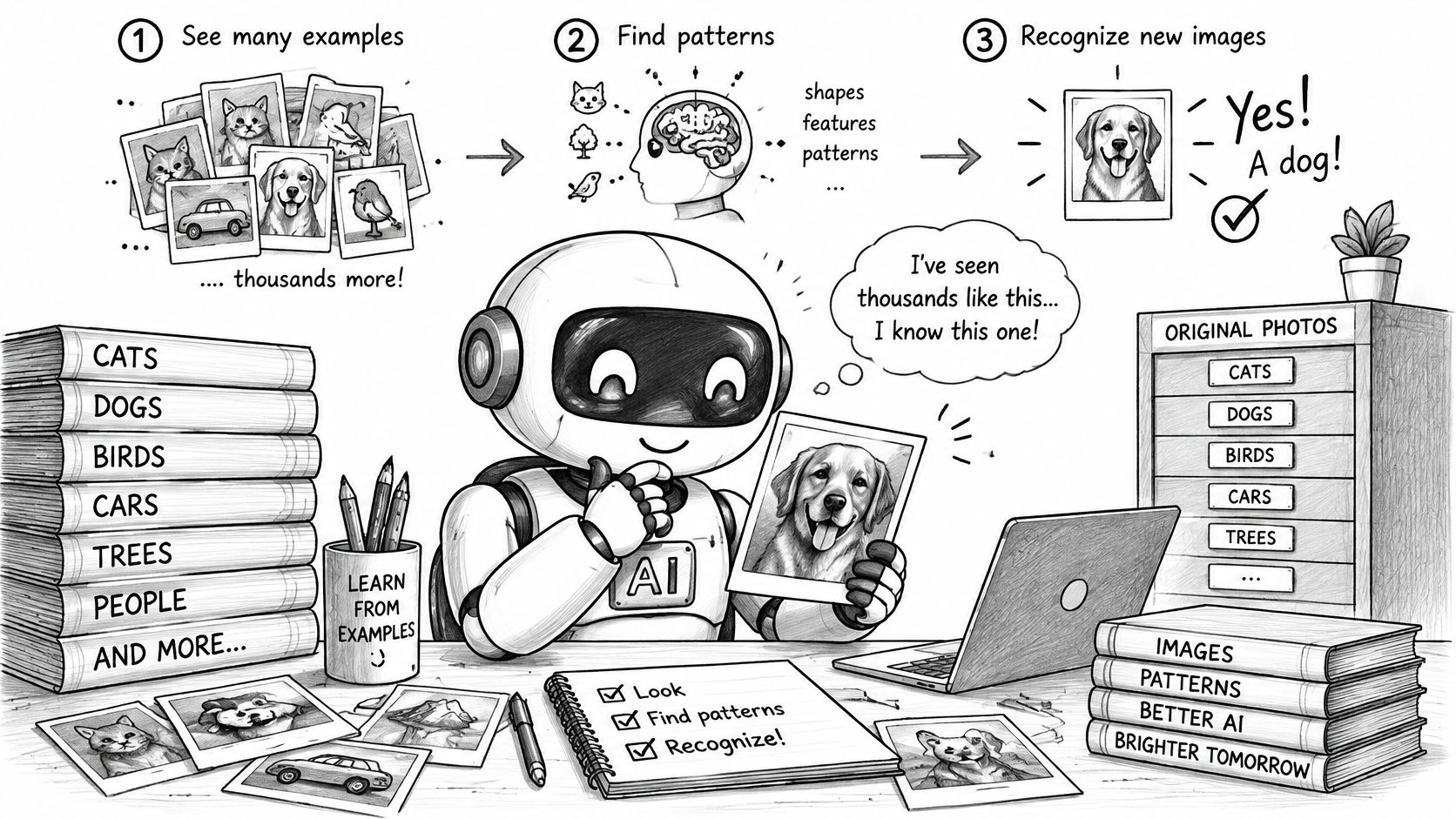
A model is closer to a student who has studied many examples than a filing cabinet holding original photographs. A student who learns to recognize bicycles can identify an unfamiliar bicycle without having seen that exact picture. Models also learn patterns that can apply to new inputs, though they don't understand the world the way people do.
Say you're training a model to distinguish product photographs from lifestyle photographs. It receives an example, produces an answer, and measures the difference between that answer and the training target. Training then adjusts internal numbers called parameters, rather like turning adjustable dials after a mistake.
Training and using a model are different
During training, those adjustments happen repeatedly across examples. When you later upload a photograph or submit a prompt, you're usually using the learned parameters, a process called inference. Writing a better prompt generally changes the instructions for that request, not the model's underlying training.
The model is the learned pattern, not the training data.
This is a useful simplification, not a promise that a model can never reproduce training material. For creative work, it explains why a generator can combine familiar patterns into a scene you haven't supplied directly.
The illustration shows the basic distinction between studying examples and recognizing something new.
More parameters don't automatically mean a better fit
Model efficiency has changed substantially. According to Stanford's 2025 AI Index overview, the smallest model exceeding 60% on MMLU in 2022 was Google's PaLM with 540 billion parameters; by 2024, Microsoft's Phi-3-mini reached that threshold with 3.8 billion, a reduction of about 99.3%.
That's a language benchmark, not an image-quality score. The practical lesson is that size alone isn't a reliable purchasing guide. Compact models can require less memory, while suitability still depends on the task.
For written instructions, LLMrefs' explanation of prompt engineering for generated text offers additional context. For images, describe observable features such as shape, lighting, composition, and motion rather than relying on vague requests for a professional result.
A generator can produce an unfamiliar scene because it has learned relationships among those features. Whether the result is useful depends on its training and how clearly your input describes the intended outcome.
Build a Photo-to-Video Clip Step by Step
A skincare bottle needs a short social ad. Begin with a clear product photo and one simple movement, such as a slow camera push-in. Adding hands, pouring liquid, changing backgrounds, and dialogue all at once gives the generator more details to get wrong.
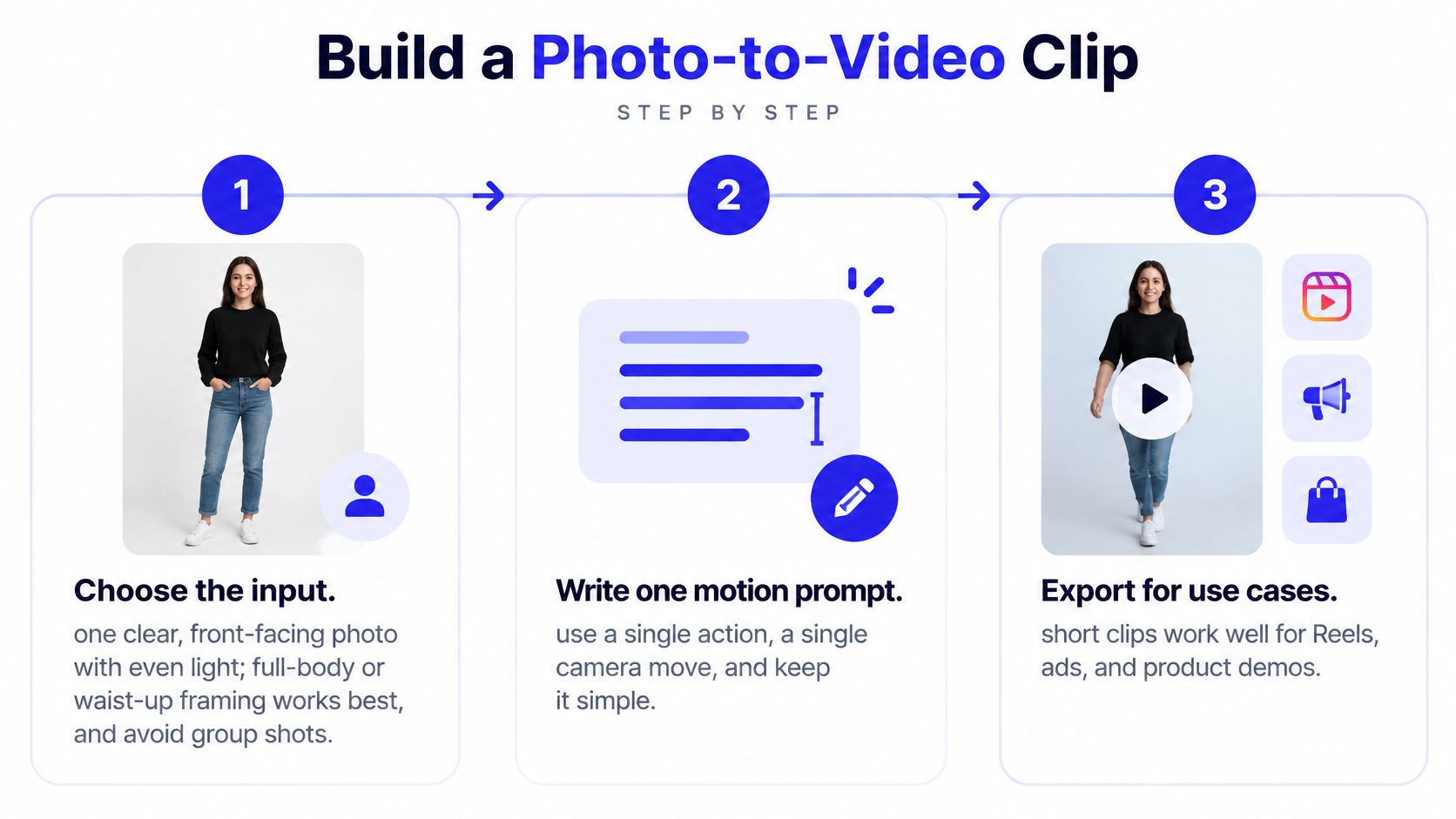
Use the steps below to make a draft, check it, and prepare the result for its placement.
Prepare and generate the draft
Choose a clean input. Start with a sharp, evenly lit photo where the product is fully visible. For a person, use a front-facing, waist-up, or full-body view, and avoid group shots at first. A small or partly hidden subject leaves more details for the model to invent.
Describe one movement. State the action, camera movement, and mood. For example: Slow push-in toward the skincare bottle on the counter. A soft shadow moves across the background. Calm afternoon light. Preserve the bottle shape, cap, label, and product color. No added objects or text. These instructions make your priorities clear, but they cannot guarantee that every detail stays unchanged.
Test the motion before refining detail. If the selected model supports it, use a 480p draft to check framing and movement. After approving the action, choose 720p or higher where available. Pick a supported duration long enough to show the product clearly, without extending a simple action just to fill time. Depending on the model, video lengths range from 1 to 15 seconds.
Choose the input mode that fits the scene. The Image to Video workflow starts with a photo, while Text to Video starts with a written scene description. Start-End Frame is useful when the clip needs to finish on a particular view. Reference mode accepts up to 7 uploaded images of people, products, or places and combines them into one scene. All plans include access to all AI video and image tools; resolution access and credit allowances differ.
Check the displayed credit cost before creating. Cost depends on the model, resolution, and duration selected. The amount shown before you generate is the amount that applies, so compare costs after changing settings rather than assuming another model will cost the same.
For a wider comparison of top tools for AI-generated videos, examine the input controls and export requirements alongside the sample clips.
The accompanying video shows the creation process.
Review, export, and reuse
Inspect the whole clip before making a final render. Check the opening and ending, then scrub through the middle. Compare the bottle with the source photo: look for changes to its shape, cap, label, or color. If the packaging is wrong, revise the prompt or try another draft. Higher resolution may sharpen the image, but it will not necessarily correct a change in the product.
Match the export to its destination. Check the platform's current requirements for aspect ratio, resolution, duration, and file size. Render at or above the required dimensions when possible, rather than enlarging a low-resolution draft. A placement designed for vertical video may crop a square or horizontal composition.
Make placement-specific edits. Keep captions readable and leave important packaging and text clear of interface overlays. Use a focused cut for a product ad, or assemble approved scenes into a longer Reel if the story needs more explanation. Check the destination's requirements again before uploading.
When exact wording matters, add captions and promotional claims in a video editor. You can then fix a price, spelling error, or offer without generating the visual scene again.
Classifiers and Generators Judged Differently
A photo library needs labels; a product clip needs to preserve what the viewer should see. Classifiers and generators handle these different jobs, so they need different tests.
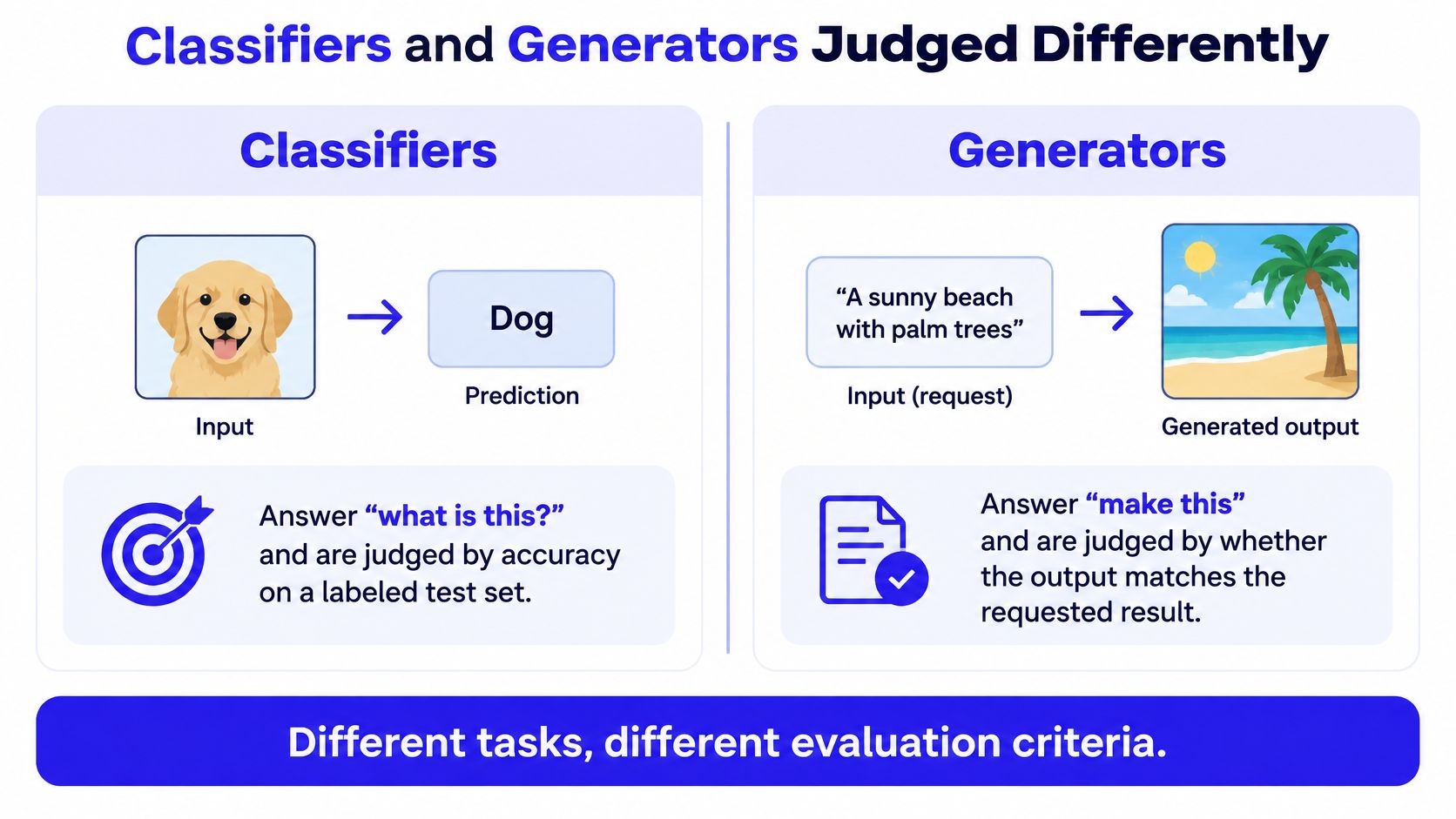
A classifier assigns an input to a category, such as “bottle” or “shoe.” A generator uses a prompt, an image, or both to create new content. Its result may vary, but it still needs to meet the brief and avoid important errors.
Classifiers and generators compared
| Criterion | Classifier | Generator |
|---|---|---|
| Question it answers | What is this? | What should I create? |
| Typical example | ResNet-50 | Text-to-image or image-to-video generator |
| Judged by | Agreement with labels in a test set | Prompt match, consistency across frames, and visible errors |
| What the score misses | A label score does not measure whether a video stays consistent over time | A prompt-alignment score does not establish that every detail is correct |
| Best use | Sorting a photo library | Creating product clips and ad visuals |
What a classification score actually measures
ResNet-50 is a residual convolutional neural network for image classification. It achieves roughly 75% top-1 accuracy on ImageNet. Top-1 accuracy checks whether the model's highest-ranked label matches the expected label. It does not measure whether a generated face stays recognizable or a bottle keeps its original label as it moves.
ResNet's residual skip connections give training signals, called gradients, a direct path through the network. These shortcuts make deeper networks easier to train. They improve classification, but a classification benchmark cannot stand in for a creative-quality test.
The infographic below contrasts the two tasks and their evaluation criteria.
Evaluate what the viewer will actually receive
For generators, CLIP-based prompt alignment can help check whether an image relates to its description. Perceptual similarity can help compare visual resemblance. Neither confirms that small product details are accurate, so inspect those details directly.
Human preference tests answer a separate question: which acceptable result do viewers prefer? Track visible failures separately, such as a changed product, an inconsistent face, or errors in a scene with several objects. A visually appealing clip with the wrong product still fails its intended purpose.
For a photo library, test whether the classifier assigns the right labels. For a product clip or ad visual, judge the generated asset against clear acceptance criteria, including prompt match, consistency, and factual details.
Test One Prompt Across Models and Markets
A product clip can look convincing in one language and miss the mark in another. Compare models with the same product photo, prompt, and settings so that differences in results are easier to trace to the model rather than to a changed brief.
Repeat the test in the languages your customers use. Ask a fluent reviewer to adapt regional references while preserving the prompt's meaning; literal translation can miss local context.
Keep the comparison controlled
Use a repeatable test procedure:
- Fix the brief. Record the source photo, prompt, settings, and required product details. The guide to writing image-generation prompts can help you separate subject, setting, and style.
- Localize deliberately. Check relevant clothing, interiors, seasonal cues, and cultural references. Avoid asking a model to represent an entire market through a stereotype.
- Inspect the delivery experience. View exports on a phone and over a slow connection. Check whether captions stay readable and compression obscures product information.
- Log failures consistently. Record identity drift, incorrect product details, temporal flicker, and audio-picture mismatches by model and language. Mark each output usable, repairable, or rejected.
Generative AI adoption varies across regions and audiences. A strong result in one market does not show that the same model will work equally well for every audience.
Choose for your audience, not the demonstration
Compare cost per usable output, including rejected generations and editing time. A lower generation cost may still lead to a more expensive finished asset if more outputs need repair.
A polished English-language demonstration on a powerful computer does not establish that the workflow will serve customers using different languages, devices, or delivery conditions.
Choose the model that most consistently meets your product and audience requirements. Keep the test sheet so you can compare future model changes against the same brief, rather than relying on memory.
Limits, Checks and Copyright Before You Publish
AI outputs can be inaccurate, incomplete, biased, or misleading, and they aren't professional advice. A convincing visual is not evidence that a depicted product feature, result, or event is real.
Before an asset reaches an ad account or product page, assign a human reviewer who knows the product. Give that person the approved source photograph, campaign claims, and intended placement, not just the generated clip.
Review by failure mode
- Identity drift. Check whether the same person remains recognizable throughout the clip. Pay attention to facial structure, clothing, and accessories.
- Wrong product details. Inspect logos, label wording, colors, controls, proportions, and package contents against the actual item.
- Temporal flicker. Watch for shimmering backgrounds, changing textures, disappearing objects, and inconsistent shadows.
- Unsafe or unintended edits. Reject misleading transformations, unauthorized likeness use, or demonstrations of unsafe product use.
- Audio mismatch. Listen for incorrect dialogue, missing sounds, or effects that imply an action the picture doesn't show.
Don't publish a synthetic demonstration as proof of real product performance. When a claim depends on what physically happened, use verified footage or another appropriate form of evidence.
Keep a record of human authorship
The U.S. Copyright Office's AI registration guidance explains that AI-assisted works can receive protection for a human creator's original contributions, but applicants must disclose AI-generated material and briefly explain their human contribution. Prompts alone generally don't provide sufficient human control when the system determines the expressive elements.
Keep the concept notes, shot selections, edits, compositing decisions, typography, and sequencing records. Save source photographs, generated originals, and editable project files so the human-authored work can be identified separately.
Also distinguish permission to use a service's output from copyright protection in that output. Review our terms of service before commercial publication, and verify rights to uploaded photographs, identifiable people, music, and other source material.
These records don't guarantee protection or eliminate legal risk. They help separate your creative contributions from generated material when preparing commercial assets or considering registration.
ImagesArt AI offers text-to-video, image-to-video, reference-guided generation, and image tools with access to multiple models in one workspace. Visit ImagesArt AI with a product photo and a simple motion prompt, then compare drafts against your product details before choosing a final clip.