AI Image Prompts Reference: Fields, Terms and Examples
ImagesArt.ai
11/28/2026
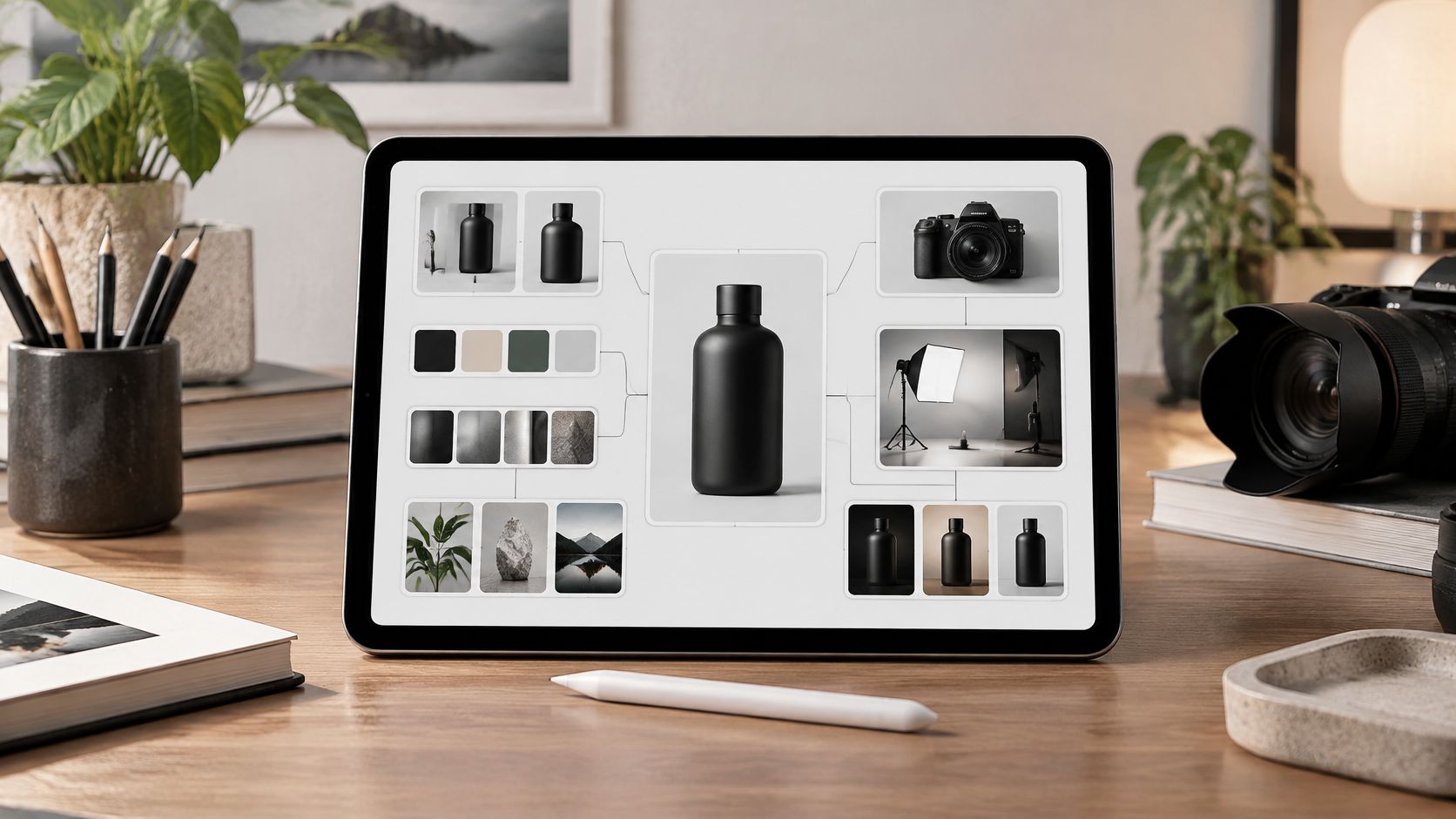
Researchers who analyzed 72,980 real Stable Diffusion prompts found something more interesting than a list of style keywords. Users were writing structured creative instructions, specifying medium, lighting, camera perspective, subject attributes and cultural context, as the 2023 study of prompt behavior documents across its full sample.
That changes how you should think about the box you type into. A prompt isn't a wish. It's a specification with parts, and each part can be checked against the picture that comes back.
This reference treats prompting that way. Every field gets a definition, a paste-ready example and a failure mode. Nothing here promises a particular result from a particular model, because models change and prompts that worked last month may need a tweak. What holds steady is the structure.
Table of Contents
- Core Prompt Fields at a Glance
- Camera, Lighting and Style Terms by Category
- Motion Prompt Fields for Short Video
- Platform Specs for Vertical and Video Outputs
- Video Prompts for Motion, Reels and Ads
- Fixing Prompts That Miss the Brief
- Checking Results Before You Publish
- Build the Prompt Field by Field and Run the First Test
Core Prompt Fields at a Glance
An ai image prompt is a structured brief that tells a model what to draw and how the picture should look. The reliable version of that brief has nine parts, written in a fixed order: subject, quantity, attributes, relationships, setting, composition, lighting, style, constraints.
| Field | What It Controls | Example Phrase |
|---|---|---|
| Subject | What the image is of | one matte-black bottle |
| Quantity | How many of each object appear | exactly three bottles |
| Attributes | Material, color, finish and size | brushed aluminum, front-facing label |
| Relationships | Position of objects relative to each other | bottle left of the glass |
| Setting | Background and environment | reflective studio surface |
| Composition | Framing and placement in the frame | centered, with space above for a headline |
| Lighting | Light direction, softness and mood | soft window light from the left |
| Style | Rendering treatment | photorealistic product photograph |
| Constraints | What must not appear | no additional logos, no text |
Each row is a clause you can test on its own. When the bottle comes back with the wrong label, you know which clause to touch, and you know which eight clauses to leave alone.
Why each field earns its place
Text-to-image evaluation research treats prompt to image alignment as its own engineering problem, separate from how pretty the output looks. Object-focused frameworks such as GenEval test whether the requested entities, attributes and relations appear, while broader surveys split semantic alignment from perceptual quality and human preference, as the alignment evaluation work sets out.
That split matters in daily use. A picture can be gorgeous and still be a failure because it has two bottles instead of three, or the glass sits on the wrong side. Score candidates against a short checklist covering object count, attribute accuracy, spatial layout, legibility and brand compliance before you fall in love with one.
Style and camera terms don't rescue a missing semantic requirement. If you never said how many, the model picks a number for you.
How long a prompt should be
Longer than you think. A large-scale analysis of prompt logs reported average prompt lengths of 27.16 words for Midjourney and 30.34 words for DiffusionDB, with medians of 20 and 26, against roughly 2.35 words for the average web-search query, according to the prompt length analysis. Image prompts run about 12 to 13 times longer than searches.
That gap is the whole point. A search query retrieves something that already exists. A prompt commissions something new, so it has to carry composition, lighting, materials, mood, viewpoint, palette, era and exclusions in one instruction.
A working template, then, is nine labeled slots you fill rather than a sentence you improvise. Change one slot per attempt. Keep the version that wins.
Camera, Lighting and Style Terms by Category
Vocabulary is where prompts usually go wrong, and not because the words are obscure. It's because a style or lighting term acts as a strong global instruction, so two of them compete for the same job and the image splits the difference.
The table groups terms by category so you can look one up, see what it changes and paste it.
| Category | Term | What It Changes | Example Phrase |
|---|---|---|---|
| Camera angle | Eye-level | Neutral, catalog-style view | eye-level view of the bottle |
| Camera angle | Low angle | Makes the subject look larger and bolder | low angle looking up at the sneaker |
| Camera angle | Overhead flat lay | Shows the arrangement of several items | overhead flat lay of skincare items |
| Framing | Close-up | Fills the frame with detail | close-up of the stitched seam |
| Framing | Wide shot | Shows environment and scale | wide shot of the showroom with one chair |
| Lighting | Soft window light | Gentle shadows and a natural feel | soft window light from the left |
| Lighting | Hard key light | Strong shadows and sharp edges | hard side light casting a sharp shadow |
| Lighting | Studio softbox | Even, clean product lighting | studio softbox lighting, no harsh shadows |
| Lighting | Golden hour backlight | Warm rim light and cinematic mood | golden hour backlight through steam |
| Mood | Calm | Quiet, minimal emotional tone | calm, minimal mood with open space |
| Mood | Energetic | Lively tone and stronger contrast | energetic mood with bold color blocks |
| Style | Photorealistic product photograph | Realistic rendering of materials | photorealistic product photograph |
| Style | Flat illustration | Simple shapes and solid colors | flat vector illustration, solid colors |
| Style | 3D render | Clean CGI look with soft materials | clean 3D render, soft materials |
| Color | Muted palette | Calm, premium tone | muted sage and cream palette |
One term per category
Pick one camera angle, one framing, one lighting setup, one style, one palette. "Soft window light" plus "studio softbox" gives the model two contradictory light sources, and the output usually looks flat or oddly lit rather than dramatic.
The same applies to style. "Photorealistic product photograph" and "flat vector illustration" in one prompt produce neither. Decide which one you want and delete the other.
Practical rule: if you can't say which single term is doing the work in a category, you have too many terms in that category.
For a whole look rather than a single term, AI style transfer is the better tool. It takes the rendering from a reference image and applies it to your subject, which is more predictable than stacking adjectives and hoping.
Where adjectives fail
Words like premium, stunning and high-end describe your reaction to a picture, not the picture itself. A model has no way to check them, and neither do you when you review the output.
Replace them with something visible. Instead of "premium bottle shot," write "one matte-black bottle, front-facing label, centered on a reflective studio surface, soft window light from the left." Now every element can be verified in two seconds.
Mood words still help, but as a complement rather than a substitute. "Calm, minimal mood with open space" pairs a feeling with a composition decision the model can act on.
Motion Prompt Fields for Short Video
A video prompt is the still-image field set plus four motion fields. Skip them and the model invents movement, which is how products start drifting around the frame.
- Action. One verb phrase, such as the hand lifts the jar, or the product turns slowly.
- Camera move. One move only. A slow push-in, a left-to-right pan, or a fixed position.
- Duration and pacing. Decide the runtime before you generate, then size the action to fit it.
- Reference inputs. A start frame and an end frame when the clip needs a defined reveal, and up to seven reference images to hold the same product or person across several shots.
The fields work together. A single action with a single camera move gives the model a clear job, and gives you a clear thing to check.
A worked motion prompt
close-up of a matte black water bottle on a stone counter, condensation forming, slow camera push-in, fixed product position, soft morning side light, premium product-ad mood, vertical 9:16 composition, leave room for headline text
Read it as slots. Subject and framing in the first clause. One action, condensation forming. One camera move, slow push-in. A lighting setup. A mood. An aspect ratio. And a composition constraint that reserves space for type you'll add later.
The one-field revision rule
When the product wobbles or changes shape, don't rewrite the prompt. Replace the motion clause. Swap "dynamic movement" for "slow push-in, fixed product position" and regenerate.
That single substitution tells you whether the problem was the motion instruction or something else. Rewrite the whole prompt and you learn nothing.
One more fix worth knowing before you spend credits. A horizontal source photograph should be reframed into a vertical version, not stretched. Stretching distorts the product and reads as amateur on a phone screen.
When you want to restyle existing footage rather than generate from scratch, video to video AI keeps the original motion and changes the look, which avoids re-specifying the camera work at all.
Platform Specs for Vertical and Video Outputs
Match the file to the destination before you generate, not after. The table is the check to run before upload, and every value in it belongs to the platform, not to your AI tool's default.
| Platform | Aspect Ratio | Resolution and Frame Rate | Duration | File Type and Size |
|---|---|---|---|---|
| Instagram Reels | 9:16 recommended, 1.91:1 to 9:16 allowed | 720 px minimum, 30 FPS minimum | 3 seconds to 15 minutes | MP4 or MOV, H.264 or HEVC video, AAC audio, 300 MB maximum |
| TikTok App Bundle video ads | 9:16 vertical | At least 720 by 1280 px | 5 to 60 seconds, 21 to 30 seconds recommended | MP4 or MOV, 500 MB maximum |
The Reels row comes from two Instagram documents. The Instagram Graph API media reference sets the 9:16 recommendation to avoid cropping or blank space, plus the 3 second minimum, the 15 minute maximum, the MP4 or MOV container, H.264 or HEVC video, AAC audio and the 300 MB ceiling. Instagram's Reels publishing guidance adds the 720 pixel and 30 FPS floors.
For paid social, TikTok's App Bundle video ad specifications call for vertical 9:16 at a minimum of 720 by 1280 pixels, accept MP4 and MOV, allow 5 to 60 seconds and recommend 21 to 30 seconds, with a 500 MB limit.
Using the rows in order
Generate at the destination ratio. A 16:9 clip cropped to 9:16 loses the edges of your composition, and often the product label with them. Set the ratio in the prompt and in the tool's settings before the first generation.
Plan the runtime against the window. The TikTok recommendation of 21 to 30 seconds is a planning tool, not a limit. Sketch the hook, the demonstration and the closing frame to fit inside it.
Re-check the file after export. Size, container and codec are easy to break in a video editor, and a 300 MB ceiling is reachable with a long, high-bitrate export.
Keep a clean master before captions or overlays go on. The same clip can then be re-cut for a different placement without rebuilding it.
Video Prompts for Motion, Reels and Ads
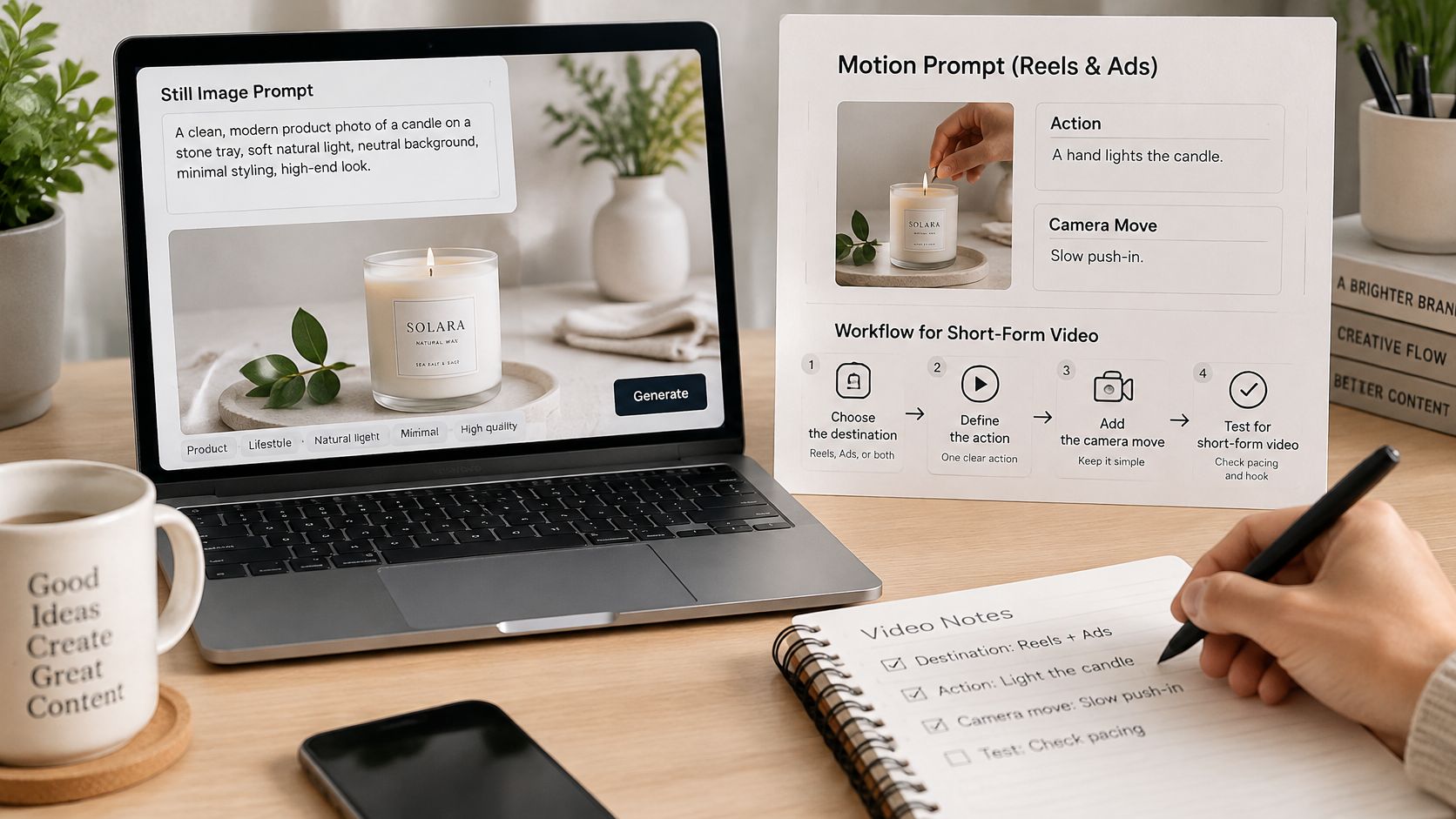
A motion prompt works like a one-line shot list. Name one clear action and one camera move, and leave everything else still. Each of those fields is something you can check in the finished clip. Change one field per iteration, then compare the file with the destination's resolution, frame rate, and framing before you publish.
Instagram's Reels publishing guidance sets a minimum resolution of 720 pixels and a minimum frame rate of 30 FPS. Those two floors describe the exported file. They do not tell you how to write the prompt.
Write the prompt around a single action and a vertical 9:16 composition, then review where the subject sits near the top and bottom edges. A workable order is photograph selection, vertical composition, motion prompt, generation, a phone preview, and final export. Each step catches a different mistake. A desktop preview often hides cropping that a phone screen shows at once.
One specification, three jobs
The Reel. The action has to read in the opening moments, so leave any slow buildup out of the prompt. Write one gesture, then check the first frame on a phone rather than a desktop monitor. "A hand turns the cap once" is a field you can see. "Energetic lifestyle motion" is not.
The product demo. Reserve the central band for the item. Keep labels and key text away from the extreme edges, where interface overlays and cropping reduce readability. A caption bar sits in the same strip where a product name along the bottom disappears.
The ad. Structure it as hook, demonstration, and call to action. Generate two or three variations of the opening hook only, and keep the demonstration prompt fixed. You are comparing one variable. If the hook wording and the camera move both change, you cannot tell which field improved the clip.
For pacing, transitions and hook structure in the edit, creative best practices for vertical video is a useful companion to the prompt work, since a well-prompted clip still fails if the first second is dead air.
Animating a still product photograph is the usual case. The usual miss is a request for generic motion. "Make it move" gives the model no field to satisfy. Ask for the camera movement you want, such as a slow push-in or a left-to-right pan, and the subject tends to hold its shape. On the next pass, change only that camera line. Then confirm the export meets 720 pixels and 30 FPS, and that the subject still clears the top and bottom of a 9:16 frame.
A first test can look like this: matte black bottle, label facing camera, centered; no action, the bottle stays fixed; camera is a slow push-in; frame is vertical 9:16 with clear space above the cap. If the bottle drifts or the label leaves the safe band, rewrite the camera line only and generate again.
Fixing Prompts That Miss the Brief
Diagnostic rule: change one field per attempt. Two changes at once and you can't tell which one fixed it, or which one broke something else.
The table runs roughly in order of how often each symptom appears, with the cause and the change that usually resolves it.
| Symptom | Likely Cause | Fix |
|---|---|---|
| Wrong number of objects | Quantity is missing or buried among other words | Put the count in its own clause, such as exactly three |
| Attributes on the wrong object | Attributes listed after several nouns | Pair each attribute with its object in one clause |
| Text or logos appear | No constraint given | Add no text or no logos, then generate again |
| Garbled words in the image | Model struggles with rendered text | Remove the text from the prompt and add it in editing |
| Style overrides the subject | Several style terms stacked | Keep one style term per prompt |
| Product changes between frames | Motion described vaguely | Specify a fixed product position and one camera move |
| Result looks generic | Only adjectives such as premium | Replace adjectives with checkable visual constraints |
| Exclusions keep failing | Negative prompts alone are unreliable | Add a reference image that shows the target |
| Prompt is refused | Content screening blocked the request | Rephrase the request; blocked prompts use no credits |
The three fixes worth understanding in detail
Wrong count and misplaced attributes share a root cause. The model attaches descriptions to the nearest noun it can find. "A bottle, a glass, a matte-black finish" leaves the finish floating between two objects. Write "one matte-black bottle beside one clear glass" and each attribute has an owner.
Style stacking is the quietest failure. Two or three style terms produce an image that looks confident and slightly wrong, which is harder to catch than a missing object. A 2025 user study on negative prompting reported frequent difficulty with exclusion instructions, including continued production of stereotypical outputs despite explicit requests for diversity, as the negative prompt and bias study describes. Wording alone doesn't reliably control what a model defaults to.
Exclusions need a picture, not just a denial. When "no extra fingers" or "no logos" keeps failing, supply a reference image that shows the target state. A visual example constrains the model far more tightly than a negation.
When the prompt is refused
Free-text prompts are screened against content policies before they reach a generation model, and blocked prompts are refused without consuming credits. That last part matters for a small team: a rejection costs you a rewrite, not budget.
Rephrase rather than resubmit the same wording. Describe the commercial intent and the visual elements plainly, and remove anything ambiguous that could read as a policy issue. For a broader set of rewriting patterns, the Drumloop AI prompting guide collects prompt structures that hold up across different generators.
Checking Results Before You Publish
Review is a checklist, not a feeling. Score each dimension separately, because a single composite score hides the failure that matters.
- Object count and attribute accuracy against the prompt. Count them. Don't eyeball.
- Spatial layout and relationships. Is the bottle left of the glass, or did the model mirror it?
- Text legibility at the size it will appear on a phone, not at 100 percent on your monitor.
- Brand compliance. Logos, colors, product details and packaging must match the approved version.
- Policy and representation review. Run the same prompt across region and demographic variants so stereotyped or inaccurate output surfaces before a customer finds it.
- File specifications. Ratio, resolution, duration, container and size for the destination.
- Opening and closing frames for video, where AI generation tends to introduce jumps, duplicate objects or drifting product details.
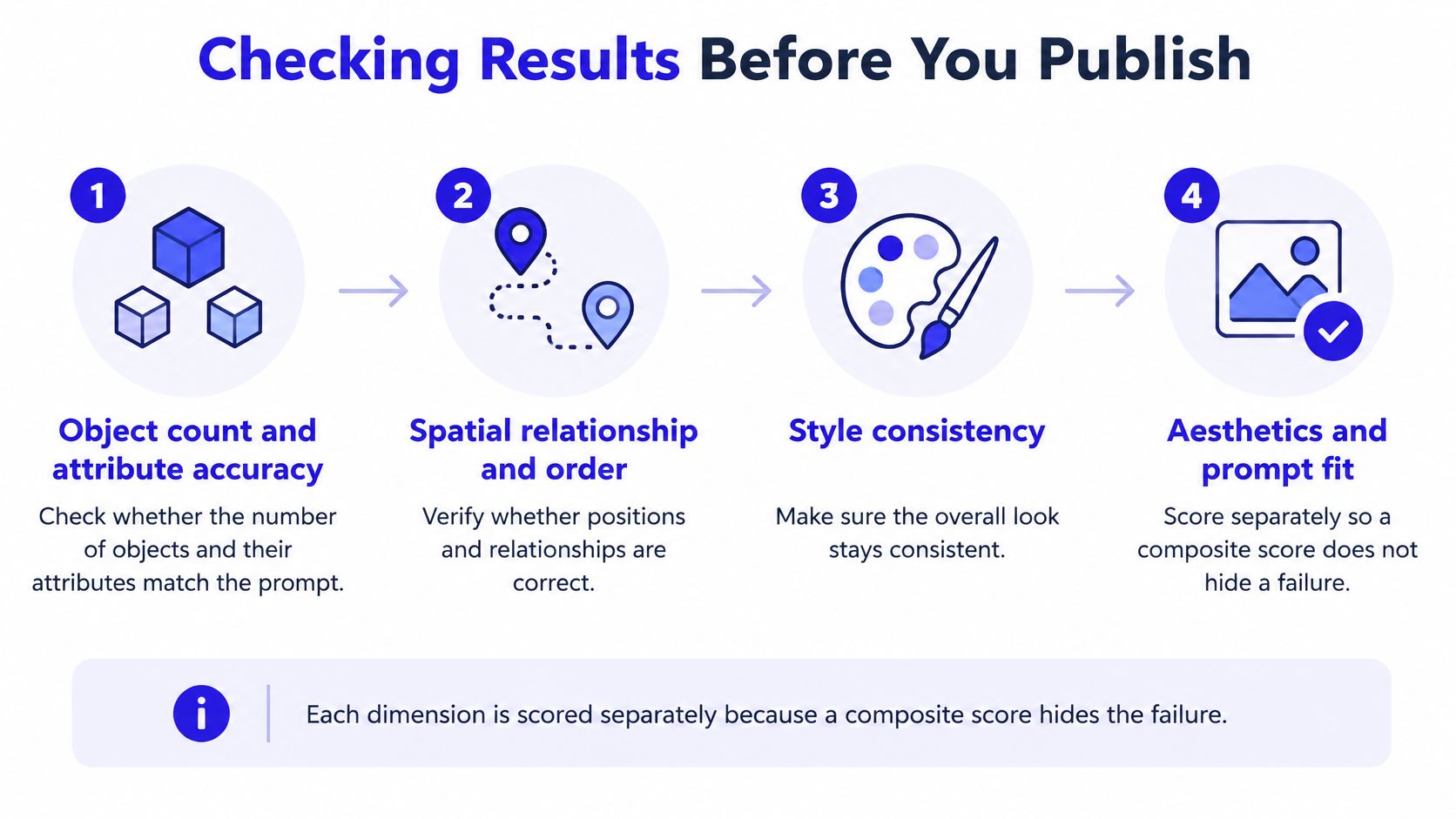
Structured assessment research makes the same argument from the measurement side: CLIP-based metrics, image-quality measures, object-focused alignment tests and human-preference evaluations are complementary rather than interchangeable, and structured frameworks annotate prompts with rich requirements and ask reviewers targeted questions about both alignment and visual quality, as the WACV human assessment paper sets out.
The record to keep for every approved asset
Store the exact prompt, model and version, seed when available, aspect ratio, reference inputs, negative constraints and post-processing settings. Add the per-dimension ratings rather than one number, so a future failure stays diagnosable.
Two data terms belong in that record too. When users generate image prompts, ImagesArt AI collects the prompts they input and the prompts the service generates, and the platform does not use user prompts, uploaded media or generated outputs to train its own foundation models. Check those terms before uploading client material, and note them in the project file.
A prompt that produced a strong aesthetic score but poor brand-text fidelity isn't a near-miss. It's a failure in one dimension, and the record should say so.
Build a small regression set
Keep a handful of representative prompts that never change: a single product, a multi-object scene, a typography test and a reference-image edit. Run them after every template or model change.
If the product prompt still returns one bottle and the typography prompt still garbles the headline, the change is neutral. If the multi-object scene improved but the reference edit regressed, you've found the trade-off before your client did.
A polished image that depicts the wrong subject is a specific risk in prompt optimization work, where aesthetic gains can arrive alongside weaker semantic fidelity, as the prompt optimization research notes. Separate scores catch it. A single thumbs up does not.
For retail and brand teams, published tone and imagery standards for retailers give you a defensible reference to score against, so "on brand" becomes a written standard rather than one reviewer's taste.
Build the Prompt Field by Field and Run the First Test
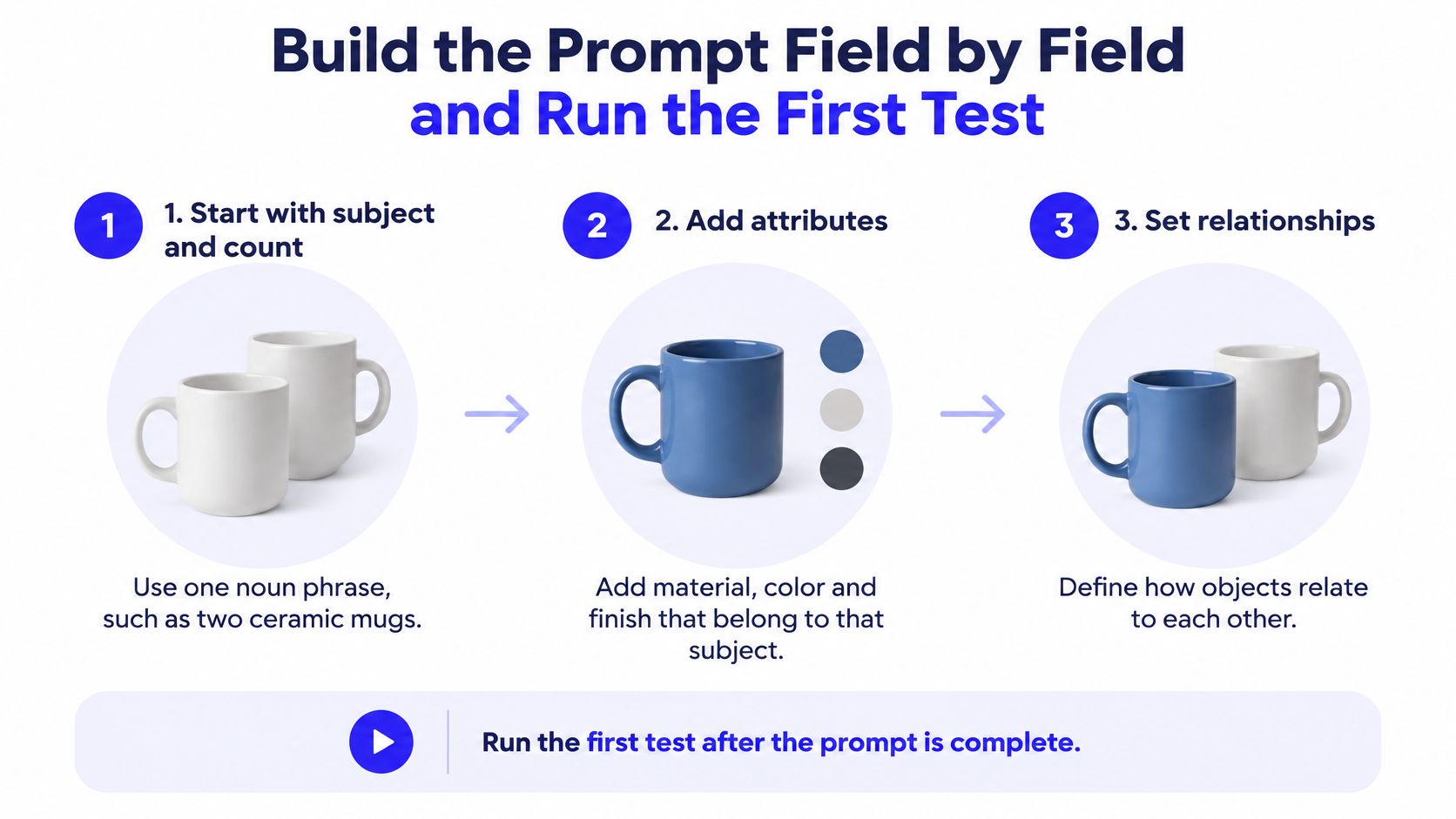
Build in the order the fields appear, and each step stays checkable.
- Subject and count as one noun phrase. Two ceramic mugs. Not "mugs," not "a pair of cups."
- Attributes that belong to that subject. Material, color and finish, written next to the noun they describe.
- Relationships and action. One mug beside the other, with steam rising.
- Setting and composition. Background, framing, and where the subject sits in the frame.
- Lighting and camera viewpoint. Soft window light from the left, eye-level view.
- One style. Photorealistic product photograph.
- Constraints last. No logos, no text, space above for a headline.
two matte-black ceramic mugs on a pale oak table, one beside the other, centered composition, soft window light from the left, eye-level view, photorealistic product photograph, no logos, no text, space above for headline
Subject and count go first because they're the fields models most often ignore, and you want them early where the wording is unambiguous. Constraints go last so you can check them against the output in one pass.
Run the first test in one session
Generate one still and score it against the checklist. Then produce one 9:16 clip from the same subject using the four motion fields, and confirm the output against the destination specs.
Now change one field, regenerate and compare side by side. A tighter framing, a different camera angle, a fixed position instead of a slow drift. One change, one comparison, one decision.
Adobe's video generation prompting documentation separates content, emotion, setting and camera angle as distinct controls, and treats aspect ratio, resolution and duration as settings alongside the text rather than part of it. It also recommends generating one version with a restrained camera move, checking whether the product stays stable, and revising only the failing instruction, such as replacing "dynamic movement" with "slow push-in, fixed product position."
The same logic applies to resolution. Test at a lower setting, then regenerate the approved treatment at delivery quality. You're spending credits on decisions, not on guesses.
When you're ready to run the build against a live model, the AI image generator takes the finished nine-field prompt and produces the still you'll score. Save the winner as a template, because a template is what turns one good prompt into a repeatable workflow for the whole team.
New accounts come with 15 credits and no card required, and the free tier supports 480p video, which is enough to run the first test end to end before committing to a plan.
ImagesArt AI gives you one workspace for the whole loop this guide describes: the nine-field image prompt, the four motion fields, start and end frames for a defined reveal, and up to seven reference images to hold a product or person consistent across shots, all across multiple models so you can compare treatments without switching tools. You can test a prompt at 480p on the free tier, then regenerate the approved version at delivery quality once the checklist passes. Visit ImagesArt AI to build your first prompt, score the output against the destination specs, and keep the version that survives review.